PractiTest Updates
June 2024 Updates
Here are some updates from the past month
Product
-
New Look for the Test Sets & Runs Module
We’re excited to introduce a refreshed layout for the Test Sets & Runs module, designed to enhance efficiency and user experience. The screen includes a new search functionality for filters, making it easier to find desired test sets quickly. Additionally, you can now expand the grid to full screen for better visibility and management of your test sets.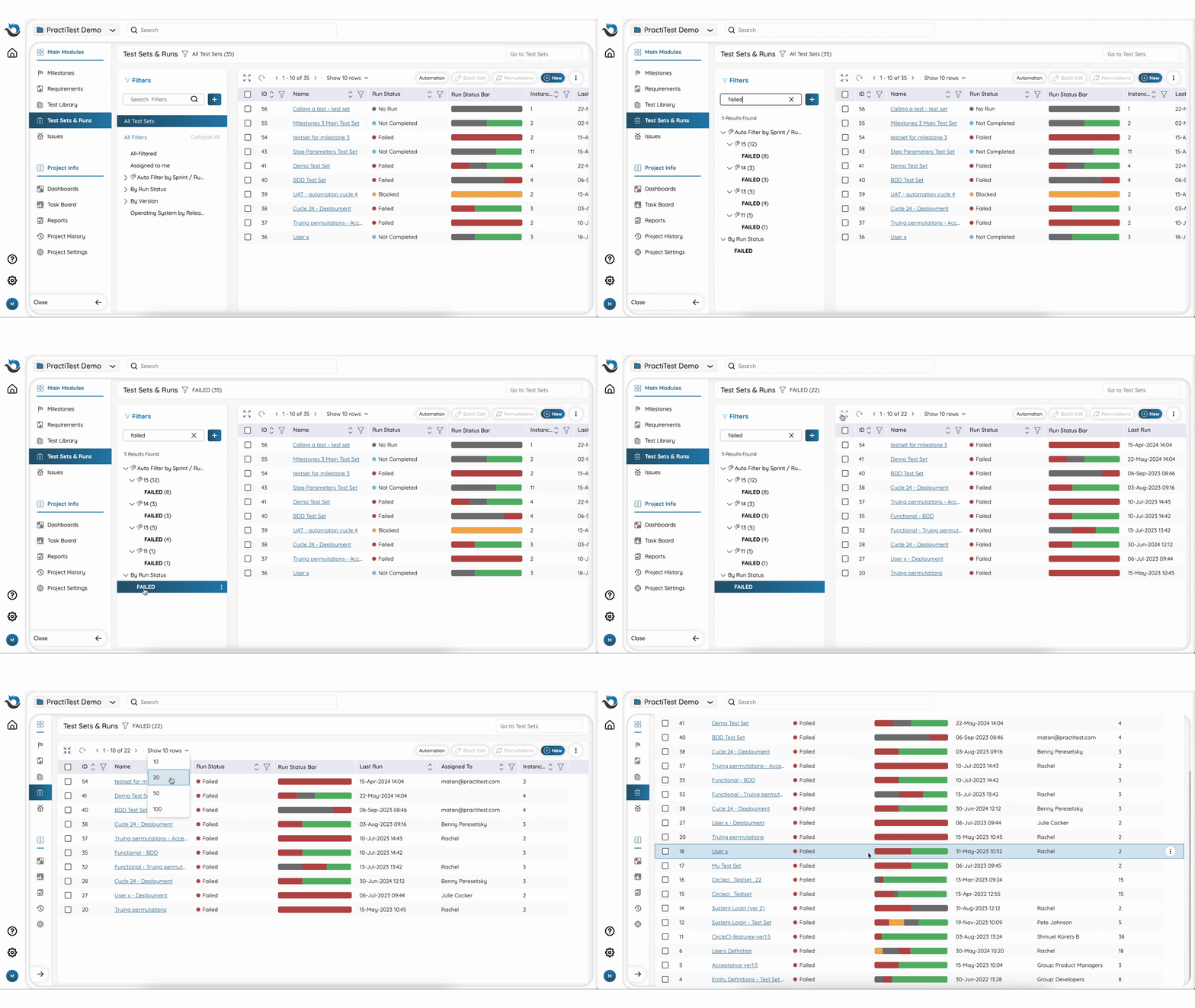
-
Find What You Need Faster with Enhanced Search
When you search for an entity, a dropdown list will display the most relevant results categorized by entity type. You can click on a specific entity to open it or proceed to the advanced search, where you can easily refine and accurately narrow your search. Click here to learn more about our search functionality.
-
New Fields to Sync for an Even Better Jira Integration
We’ve expanded our Jira integration capabilities to include three new fields: Component, Issue Type, and URL, ensuring more comprehensive data synchronization between PractiTest and Jira.
Coming Up
- PractiTest Live Training
Join our customer success team for a dedicated session around reusability in PractiTest and ask everything you want to know.
Wednesday, July 10th, 10:00 AM EST / 16:00 CET Sign up here
Can’t make it?
Join us on Wednesday, July 24th, 2:00 PM EST / 20:00 CET
PractiTest and Beyond
-
Thinking Outside The Box: Cognitive Bias and Testing with Lisa Crispin
Did you miss the recent webinar about the impact of cognitive biases on testing effectiveness by Lisa Crispin? Watch the recording now to learn strategies to identify and overcome cognitive biases and enhance creativity. -
Top 5 AI-Powered Tools for Software Testing
Check out our list of the top 5 AI-powered tools for software testing in our blog. Discover the differences between these tools and understand how each can contribute to improving your testing work. -
Test Automation Frameworks - The Complete Guide
Explore our latest article where we cover Test Automation Frameworks from A to Z, including their benefits, types, and common tools.
May 2024 Updates
Here are some updates from the past month
Product
-
Expand the Instance Grid for an Enhanced Experience
Looking for a way to view more instances in the Instance Grid? Simply click the new ‘Expand’ button to enlarge the Instance Grid.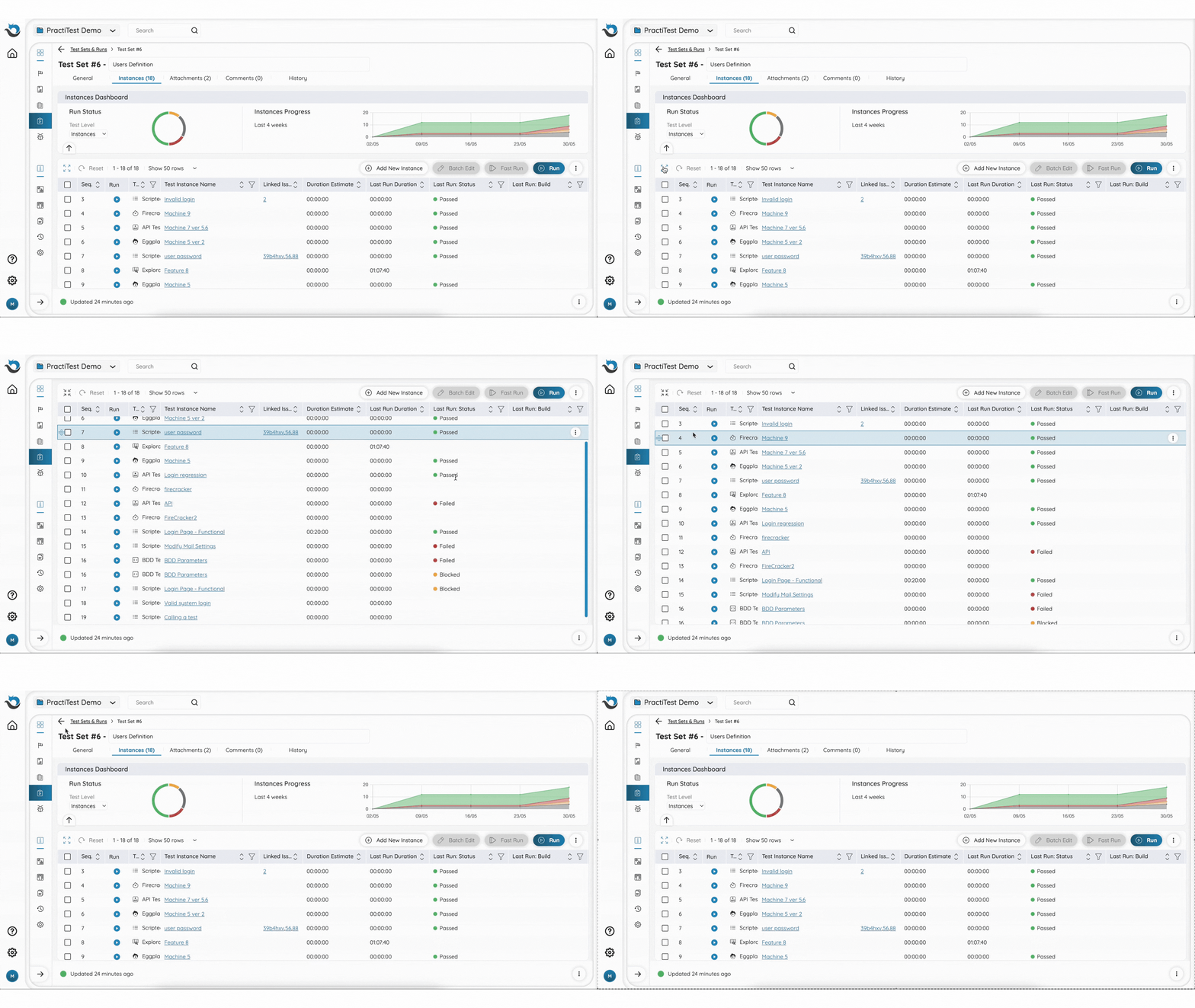
-
Robot Framework Integration
If you use Robot Framework for automation testing, you can now upload the xUnit results file directly to FireCracker to seamlessly report your automation test results to PractiTest. Click here to learn more about this integration. -
New Filter Search Functionality
When you are adding a new Instance to a Test Set, linking a new entity to a Milestone, or linking between different entities (in the new UI), you can search for a specific filter that you wish to choose entities from.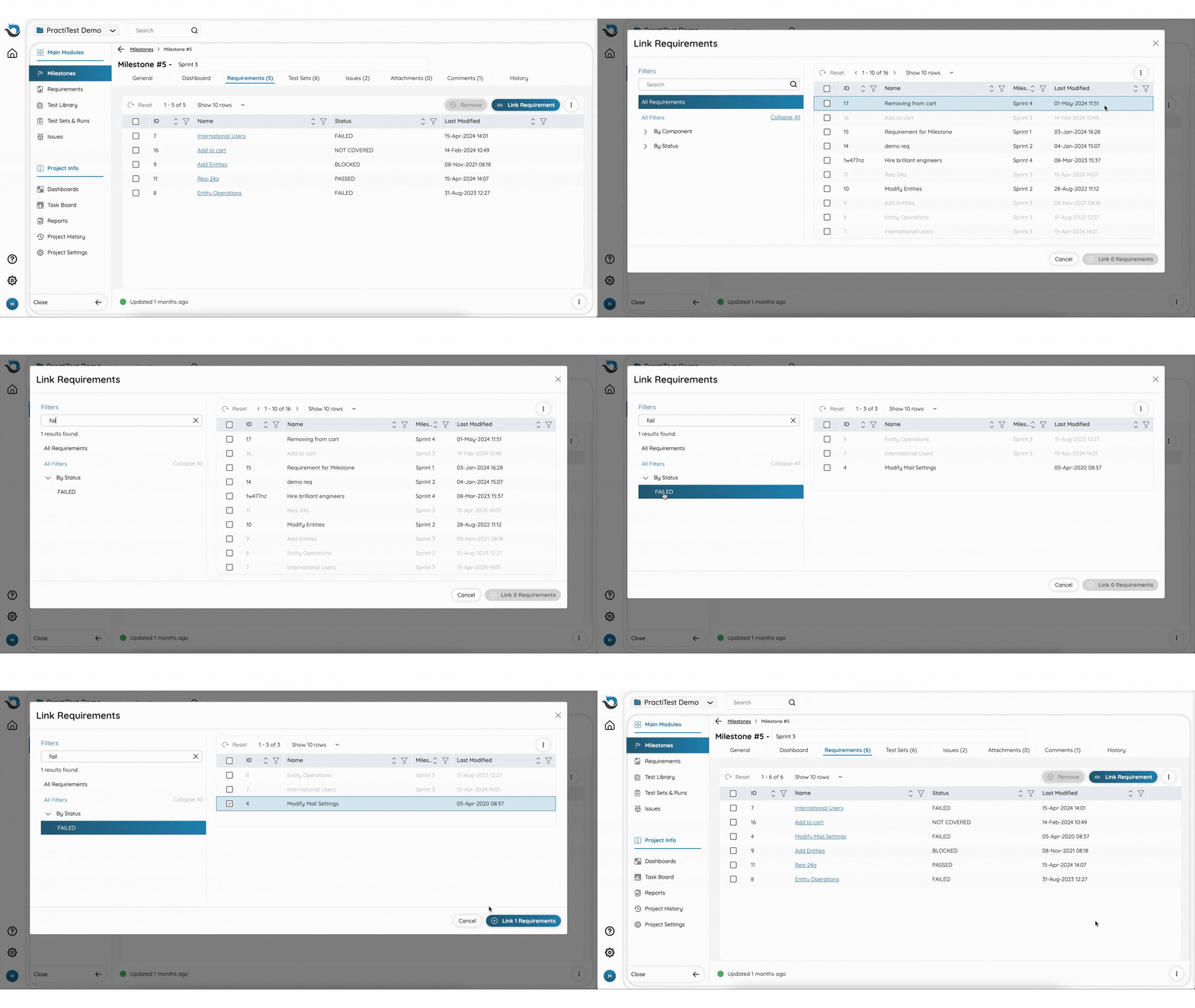
Coming Up
-
PractiTest Live Training
Join our customer success team and ask everything you want to know.
Wednesday, June 5th, 10:00 AM EST / 16:00 CET Sign up here
Can’t make it?
Join us on Wednesday, June 19th, 2:00 PM EST / 20:00 CET -
Solving the Integration Testing Puzzle - A Guest Webinar With Bas Dijkstra
Integration testing in distributed and microservices-based systems can be slow and unreliable. Contract testing, supported by tools like Pact and Pactflow, breaks down these challenges into manageable pieces. Join our webinar on June 19th at 11:00 AM EDT / 17:00 CEST to learn about the benefits and methodologies of contract testing, and see a live demo in action.
PractiTest and Beyond
-
Top 5 ALM Quality Center Alternatives in 2024
Is your test management solution outdated? ALM Quality Center’s complex UI, lack of modern integration, and high cost are driving teams to seek alternatives. Our article explores the top 5 alternatives, their features, pricing, and migration strategies. -
Beyond Hierarchical Structures: Agile Test Case Organization
Hierarchical folder structures in test management are becoming outdated for complex projects. This blog covers how custom fields and dynamic filters can create a more adaptable test case management system.
April 2024 Updates
Here are some updates from the past month
Product
- The Milestones Module is Officially Out!
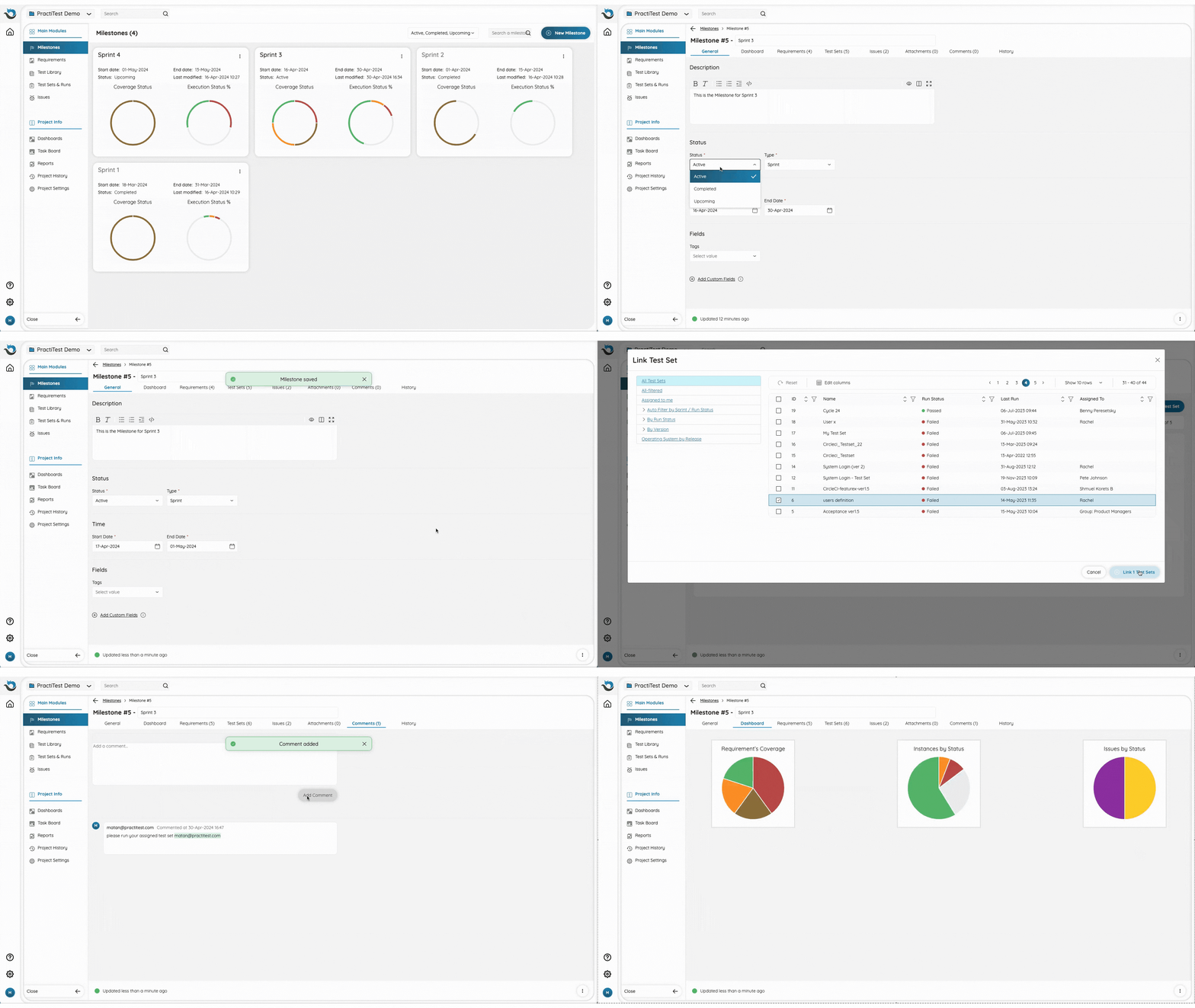
We’re thrilled to announce that our Milestones module is now available to all users! Milestones empower you to better manage and track projects and timelines, consolidate all relevant testing artifacts, and gain real-time insights with dedicated dashboards. Explore our help pages to discover more about the Milestones module.
- New Instance Detailed Execution Report with Attachments
The new report includes the attachments that were added to each step of the last run, allowing you to dive even deeper into your test execution details and gain a comprehensive understanding. Click here to learn about this new report.

Coming Up
-
PractiTest Live Training
Join our customer success team and ask everything you want to know.
Wednesday, May 8th, 10:00 AM EST / 16:00 CET
Sign up here
Can’t make it?
Join us on Tuesday, May 21st, 2:00 PM EST / 20:00 CET -
Optimizing Performance Testing - A Guest Webinar With Federico Toledo
Join us on May 22nd for a groundbreaking session as Federico Toledo introduces the Performance Testing Pyramid model, revolutionizing testing strategies for Agile and waterfall methodologies. Explore unit-level automation, integrated service tests, and client-side performance insights for unparalleled testing efficiency.
PractiTest and Beyond
-
Taming the Chaos - How to Manage Testing in Complex Environments
Dive into our blog to understand key strategies and helpful tips to better manage your testing efforts in the modern and complex software testing environment. -
Test Case Library Health Assessment
Feel like you’re drowning in test cases? Use this tool to determine whether your test case library is well-structured or in need of immediate reorganization.
March 2024 Updates
Here are some updates from the past month
Product
- Auto Sync Attachments to Jira Bug from a Test Run
When running a test and clicking “Fail & Issue” to report a bug to Jira, added attachments will be synced automatically as well.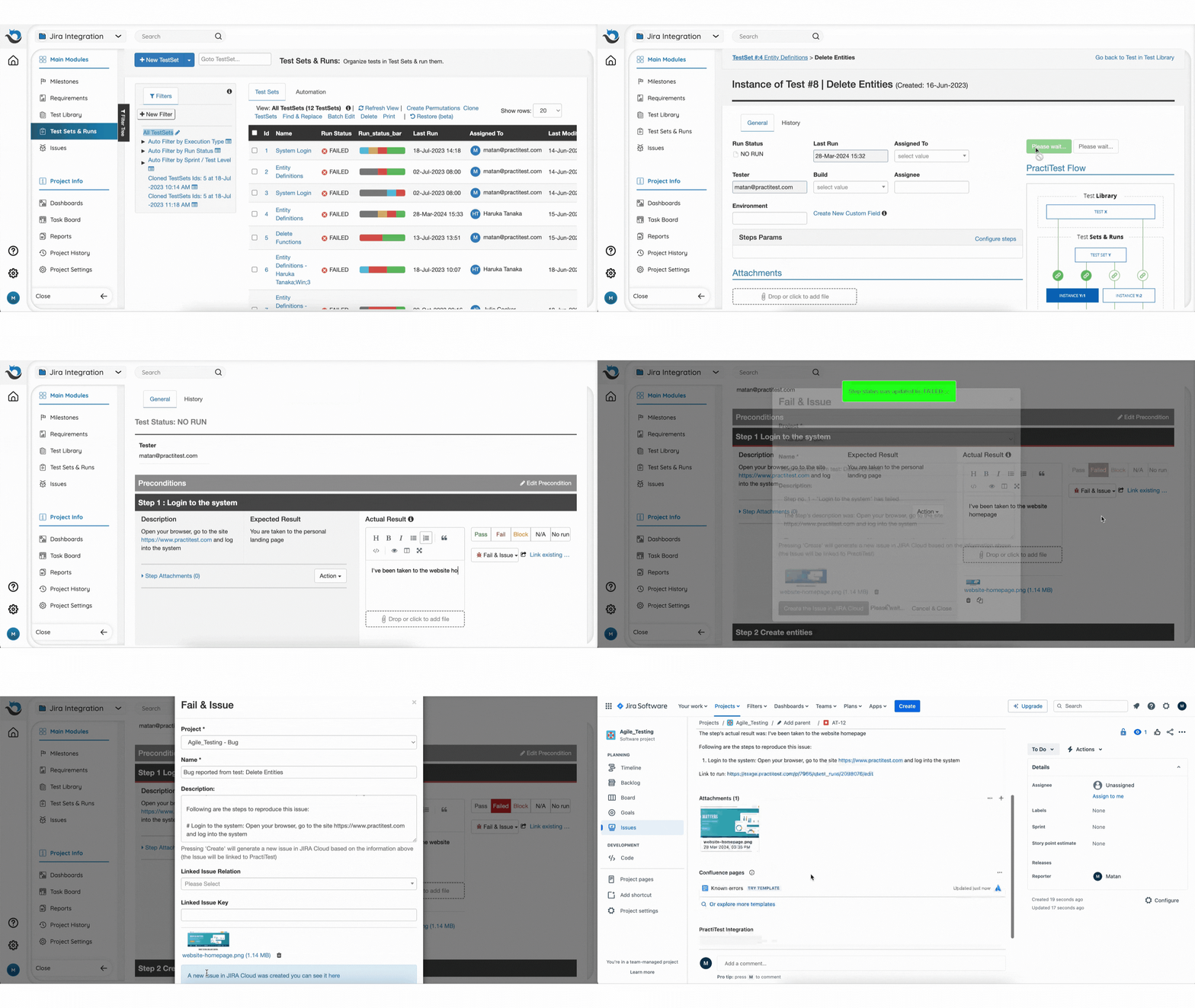
Coming Up
-
PractiTest Live Training
Join our customer success team and ask everything you want to know.
Wednesday, April 10th, 10:00 AM EST / 16:00 CET
Sign up here
Can’t make it?
Join us on Wednesday, April 24th, 2:00 PM EST / 20:00 CET -
Thinking Outside The Box - A Guest Webinar With Lisa Crispin
Have you ever heard the phrase “think outside the box” during your career in QA? If so, join Lisa Crispin on April 17th for a webinar about cognitive biases, their impact on the way we test products, and how to overcome them.
PractiTest and Beyond
-
AI in QA Operations: Steps, Benefits, & Best Practices
Delve into our recent blog to learn how AI influences QA processes, the advantages it offers, and strategies for efficiently implementing and harnessing its potential. -
How to Build Software Test Strategy On Ongoing Projects
Discover how to enhance ongoing projects with the test strategy guide by Matthew Huesser, including analysis tools and practical implementation tips.
February 2024 Updates
Here are some updates from the past month
Product
-
Introducing the New Milestones Module!
The new Milestones module enables you to define high-level testing objectives with defined timeframes. The module is currently available for a small group of users, you have the opportunity to join this exclusive group. Interested? Reach out to our Support Team and start using Milestones. Click here to learn more about Milestones in PractiTest.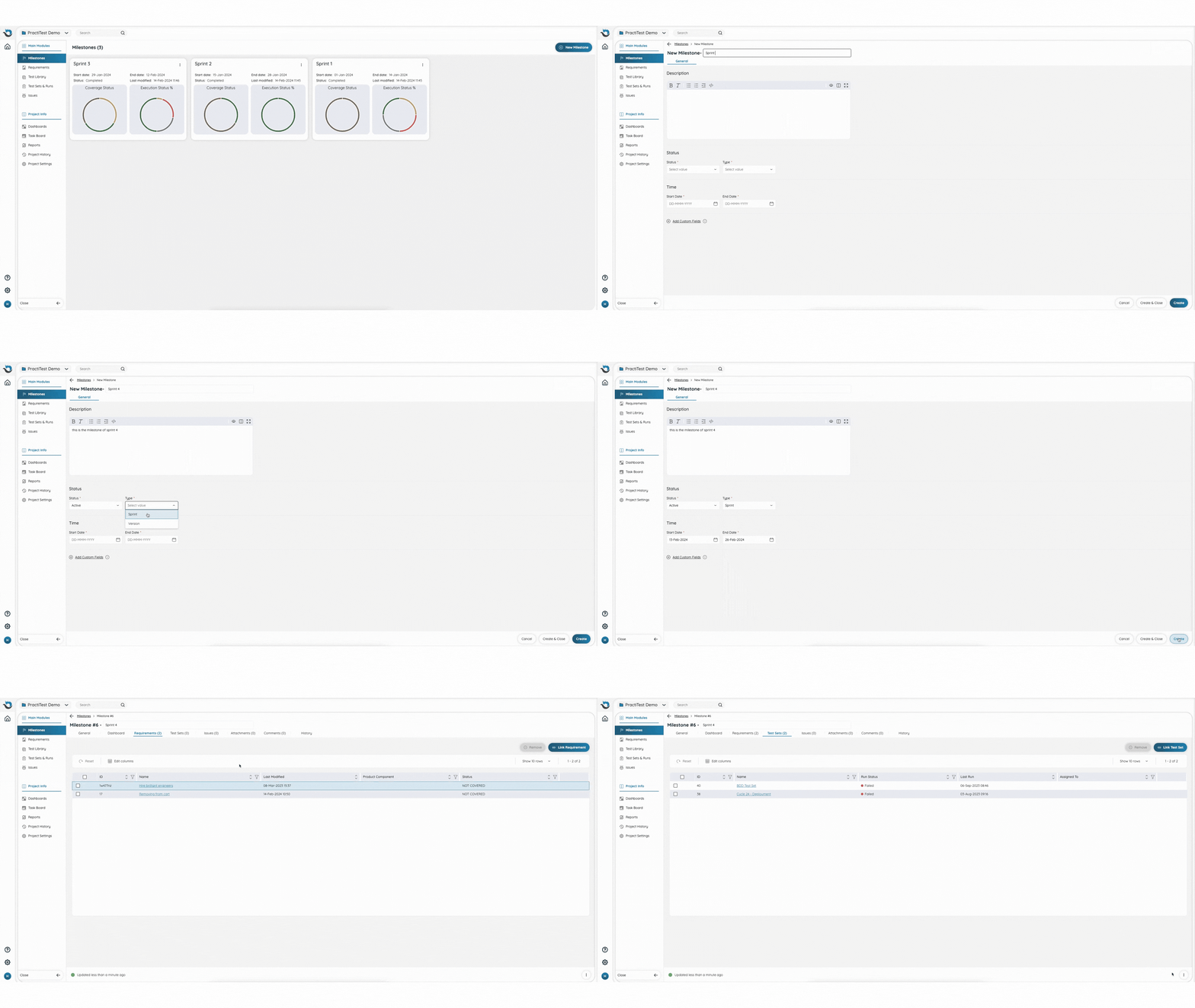
-
Reorder Button in Instances Grid
Have a lengthy list of instances in your Test Set? From now on you can easily control your instances’ order by clicking the ‘Reorder’ button.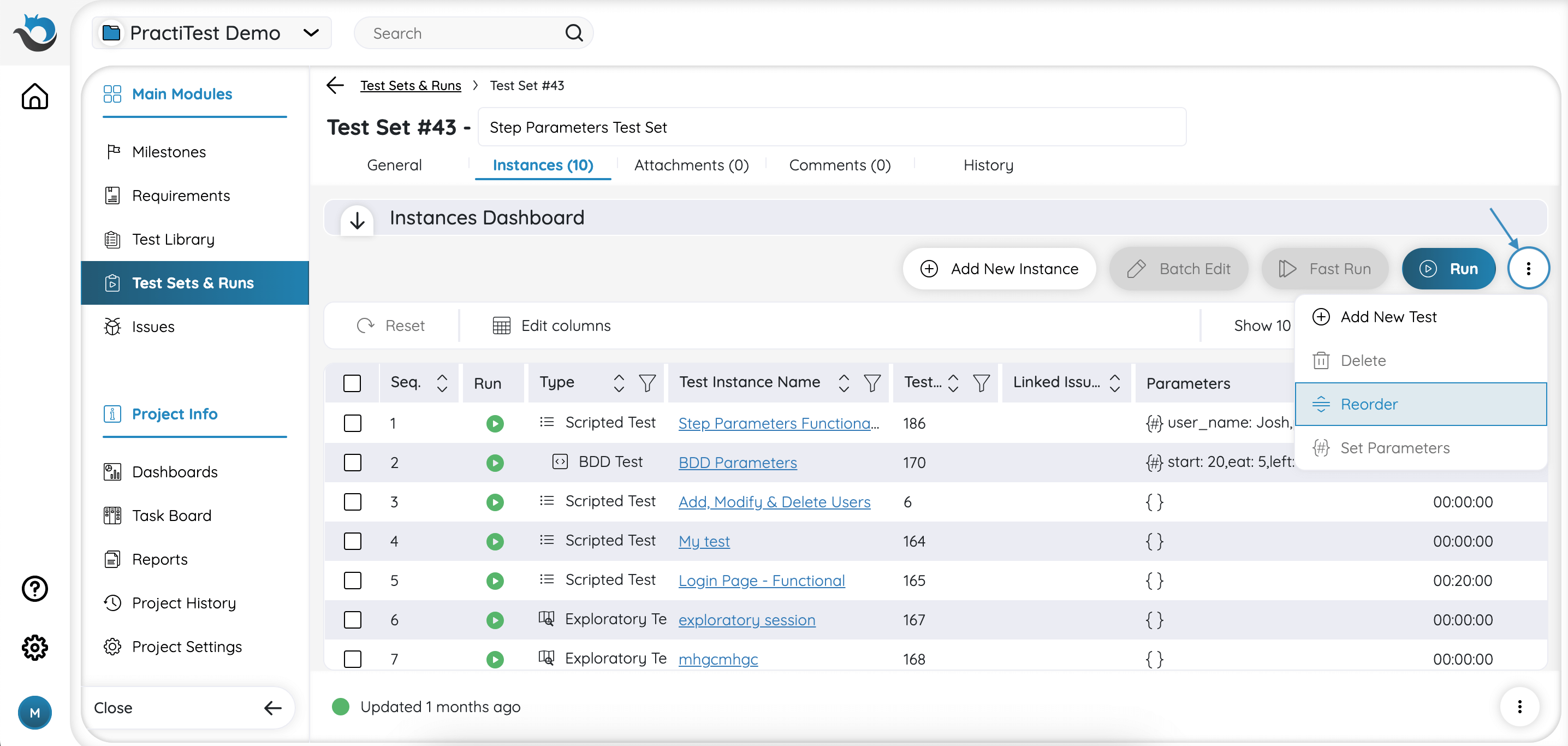
Coming Up
-
PractiTest Live Training
Join our customer success team and ask everything you want to know.
Wednesday, March 13th, 10:00 AM EST / 16:00 CET
Sign up here
Can’t make it?
Join us on Wednesday, March 27th, 2:00 PM EST / 20:00 CET -
Managing the Test Data Nightmare - A Guest Webinar By Andrew Knight
Join Andrew Knight for an insightful webinar about the world of test data management. In this talk, Andrew will delve deep into the strategies for handling both product data and test case data, offering practical solutions to avoid the nightmares that often plague testers.
PractiTest and Beyond
-
How AI Can Revolutionize Software Test Management
Dive into our latest blog to understand the impact of AI on test management. Discover real-world examples of how PractiTest test management platform leverages AI capabilities to increase efficiency in test management processes. -
End-To-End Testing: Process, Benefits & Applications
Learn the importance, methods, best practices, and role of end-to-end testing in a recent article by Laveena Ramchandani.
January 2024 Updates
Here are some updates from the past month
Coming Up
-
PractiTest Live Training
Join our customer success team and ask everything you want to know.
Wednesday, February 7th, 10:00 AM EST / 16:00 CET
Sign up here
Can’t make it?
Join us on Wednesday, February 21st, 2:00 PM EST / 20:00 CET -
Software Testing Horror Stories and Lessons Learned - LinkedIn Live
Join us for a LinkedIn Live session hosted by Joel Montvelisky, Co-Founder and Chief Solution Architect at PractiTest, and Melissa Tondy, Head of Technology Enablement at Campminder. Uncover true notorious testing stories and valuable insights to avoid pitfalls in your career. Tuesday, February 13th, 9:00 AM MST / 15:00 CET - Sign up here -
5 Practical Ways To Stand Out as a Leader - A Guest Webinar By Ajay Balamurugadas
Don’t miss out on this enriching session, as Ajay Balamurugadas shares insights from 17+ years of experience on how to embark on a transformative journey into resilient leadership and practical tools for professional growth.
Join us on Wednesday, February 21st, 9:00 AM EST / 15:00 CET
PractiTest and Beyond
-
8 Benefits of Using AI in Software Testing
Wondering how AI can contribute to better software testing? Dive deep into James Westfield’s guest blog to unveil 8 incredible benefits that AI brings to the table. -
Integrating Accessibility Testing in Software Test Management
From enhancing user experiences to compliance with legal standards the impact of accessibility testing is profound. Check out the recent blog by Federico Toledo of Abstracta, to discover the significance of accessibility testing to your QA work.
December 2023 Updates
Here are some updates from the past month
Product
-
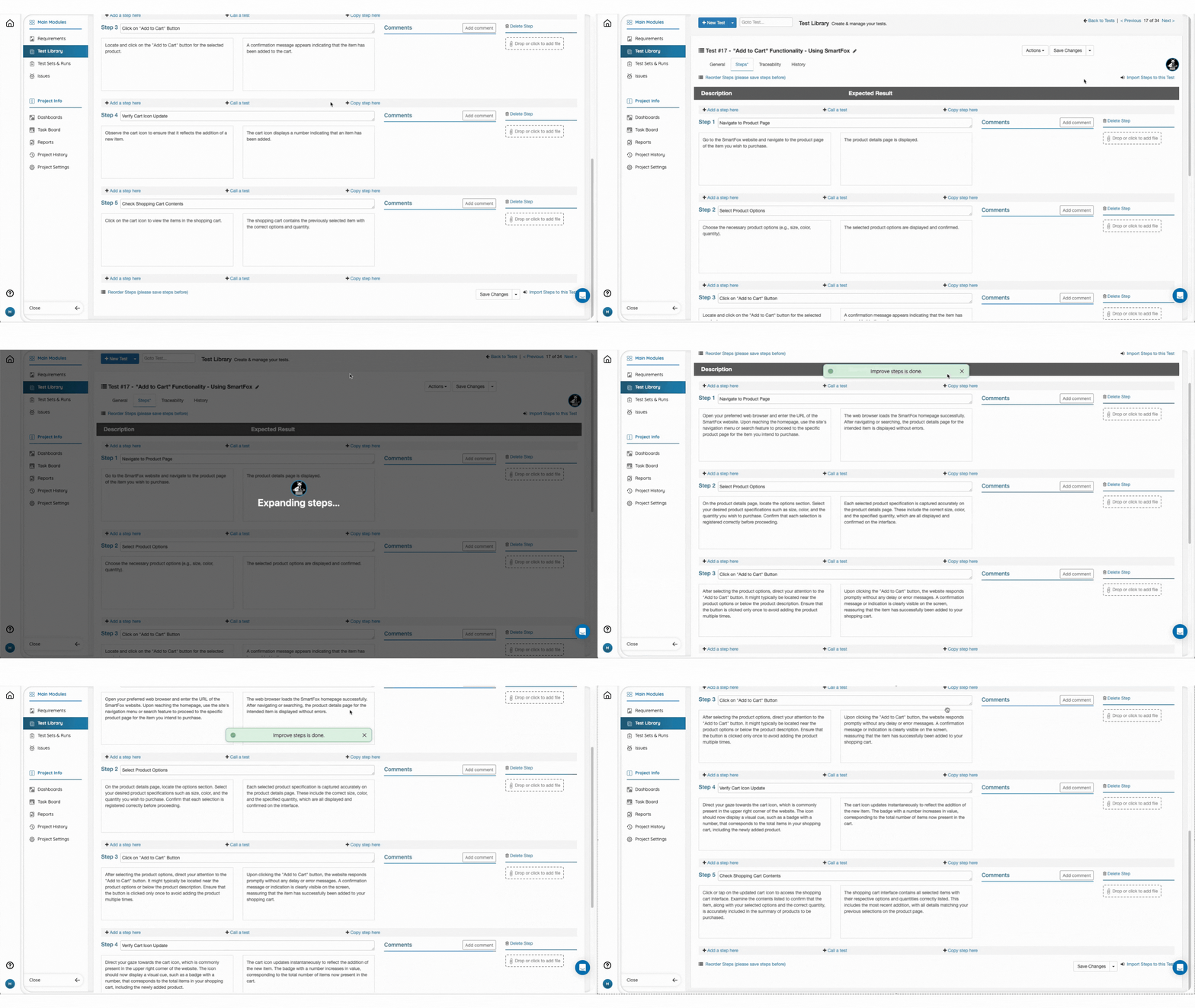
Improve Your Test Steps Using the Smart Fox
In addition to creating AI-powered test steps, the Smart Fox can now help you edit and improve your test steps. Shortening, expanding, changing tone, and fixing grammatical errors are all part of the enhanced capabilities of the Smart Fox. Read more about it here.
-
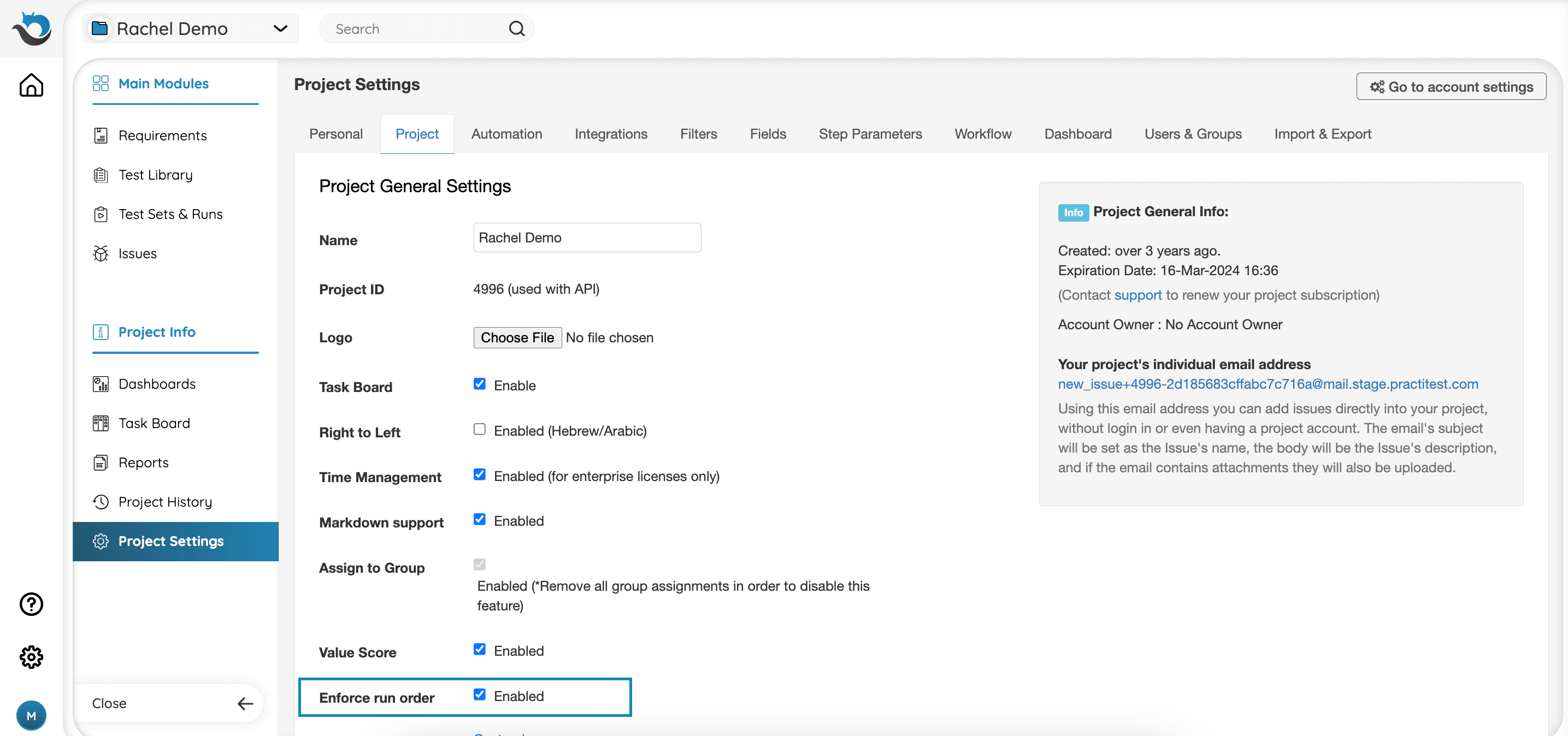
Achieve Better Testing Control By Enforcing Run Order
From now on you can create dependencies between tests. By enabling this feature, you make it mandatory for scripted tests to be executed sequentially, one after another, to ensure a more organized testing process. This is only available for Ultimate or Corporate accounts. Learn more about this capability here.
-
Enhanced API Test Run Creation
We enhanced our API capabilities, enabling you to create a test run also for Scripted Tests in addition to existing capability for Automated Tests. Check out our API documentation for more details. -
New Test Set UI Is Coming Soon
During the first week of January, we will be launching the enhanced Test Set UI for general availability. Based on your feedback, we improved the look and feel, ensuring a better user experience and increased efficiency. Click here to learn more about the Test Sets & Runs Module.
Want to be among the first to try new features? Contact our Support team to get early access and share your insights.
Coming Up
-
PractiTest Live Training
Join our customer success team and ask everything you want to know.
Wednesday, January 10th, 10:00 AM EST / 16:00 CET
Sign up here
Can’t make it?
Join us on Wednesday, January 24th, 2:00 PM EST / 20:00 CET -
Test Strategy On Ongoing Projects - A Guest Webinar By Matthew Heusser
In this upcoming guest webinar, Matthew Heusser, Managing Director at Excelon Development, shows us how to streamline your testing strategy for maximum impact across all stakeholders, from executives to project and delivery managers. Join us on Wednesday, January 17th, 10:00 AM EST / 16:00 CET.
PractiTest and Beyond
-
2023 Year in Review: How Did Software Testing Evolve?
Check out our blog to discover 2023’s main trends and challenges in software testing from AI to cybersecurity threats, and get practical tips to prepare better for 2024. -
The Guide For QA Roles and Responsibilities
Explore our latest article to understand the different roles in software testing and the distinct responsibilities and essential skills needed for each position.
November 2023 Updates
Here are some updates from the past month
Product
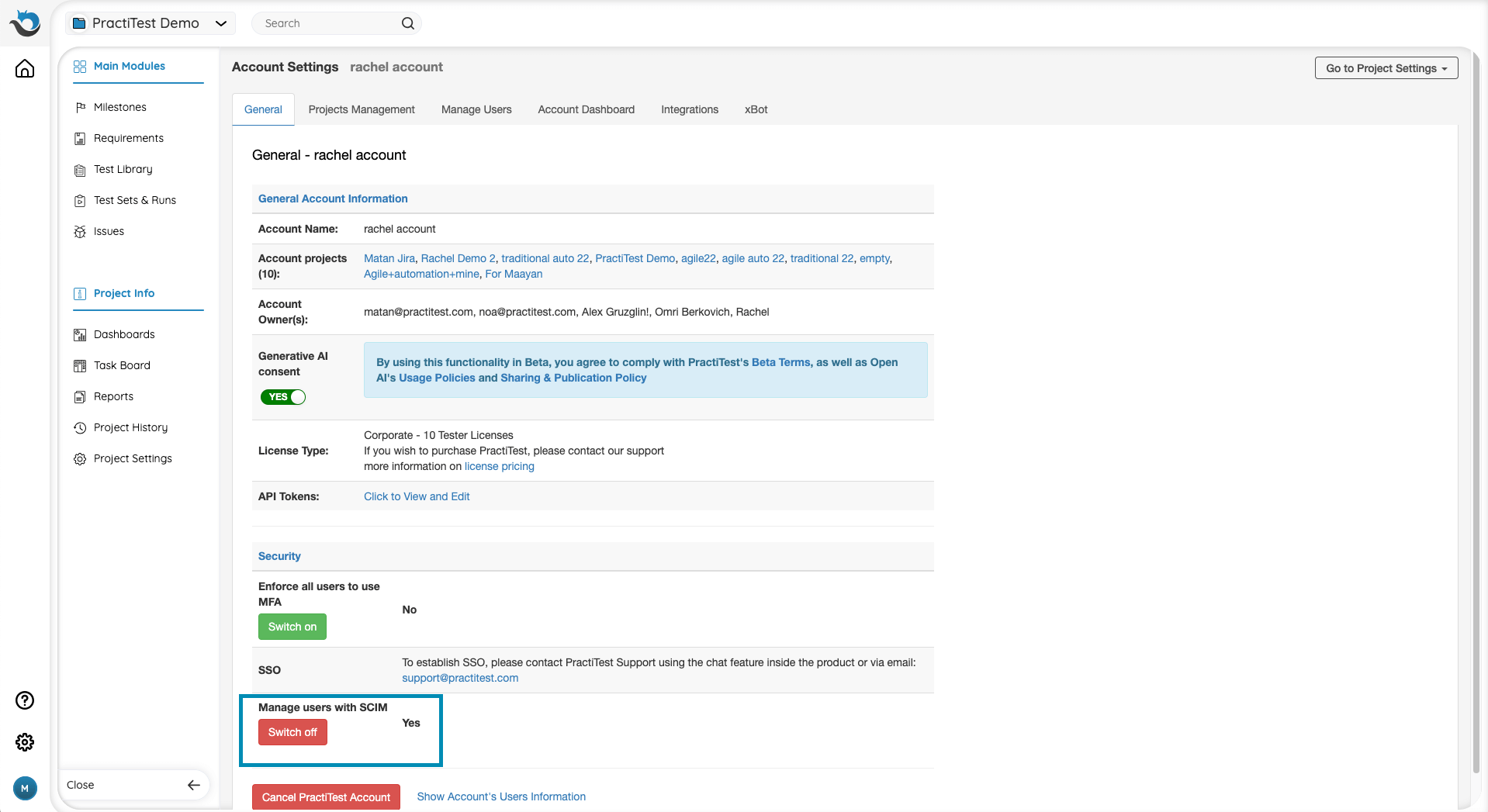
- Manage PractiTest Users Directly from Your SCIM Provider
If you’re using a SCIM provider such as Okta, from now on you can effortlessly add or remove users to PractiTest and assign them to groups and projects directly through your SCIM integration. This is only available for Ultimate or Corporate licenses. For more information, click here.
Coming up
- PractiTest Live Training
Join our customer success team and ask everything you want to know.
Tuesday, December 5th, 10:00 AM EST / 16:00 CET
Sign up here
Can’t make it?
Join us on Tuesday, December 19th, 2:00 PM EST / 20:00 CET
PractiTest and Beyond
-
How Non-Dedicated QA Platforms Fall Short of Managing Software Testing
Relying on spreadsheets, bug trackers, or various task management tools for controlling your software testing processes? Dive into our latest ebook to discover the limitations of these platforms when it comes to QA management and why embracing a dedicated test management solution is the way forward. -
Applying Behavior-Driven Development to Automation Tests
In a recent three-part webinar mini-series by Laveena Ramchandani, we delved into the basics of BDD and explored methods to consolidate it into our automated testing processes. Watch the mini-series recorded sessions or read the recap blog for comprehensive insights. -
Feeling Blessed as Software Testers?
As the holiday season starts, it’s time for us in the software testing community, to be thankful for all the great things that make our job easier and more satisfying. Read our blog about the 6 blessings software testers are thankful for.
October 2023 Updates
Here are some updates from the past month
Product
-
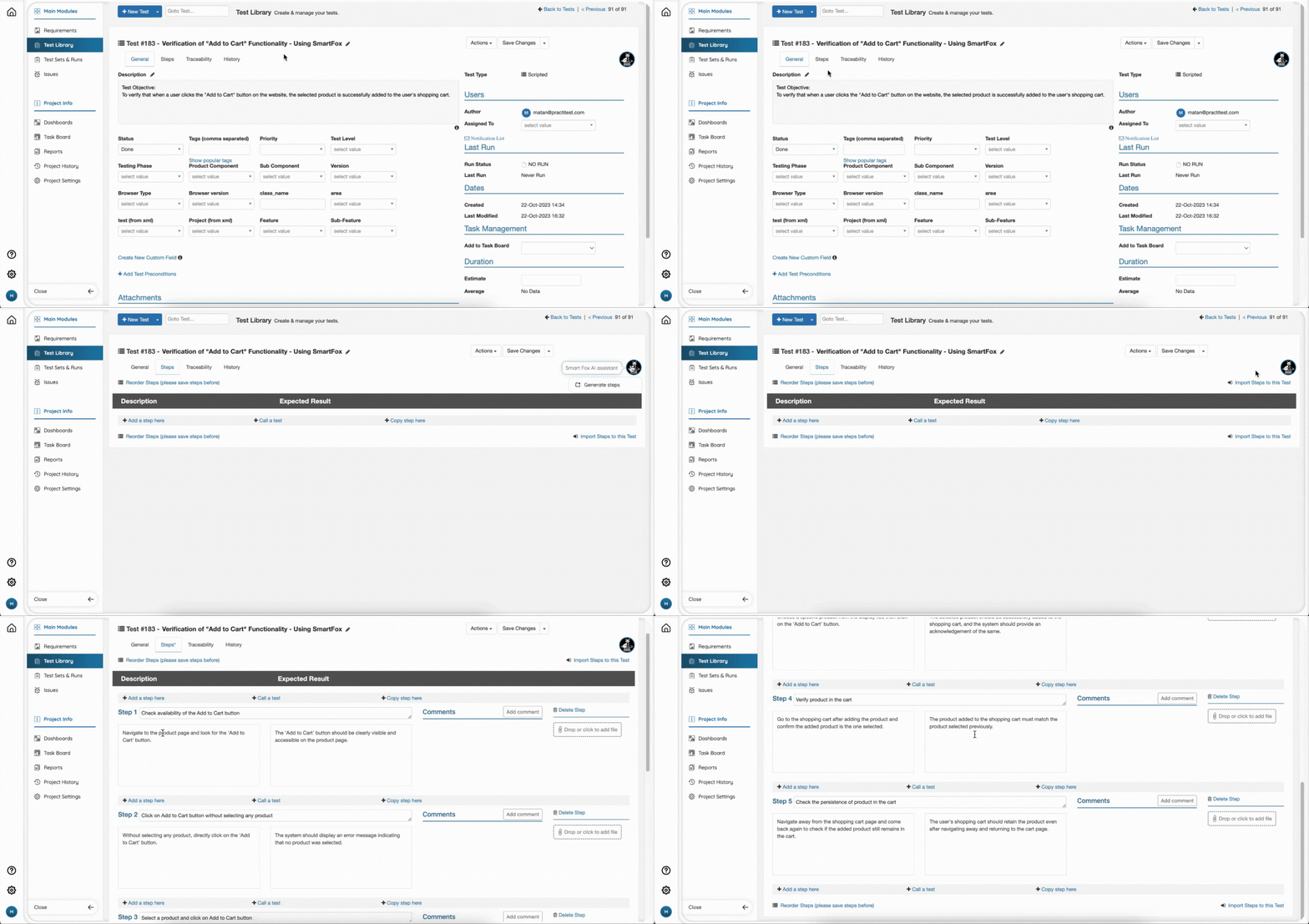
Create Effective AI-Powered Test Steps with the Smart Fox!
Introducing the Smart Fox, PractiTest’s AI assistant, designed to simplify the process of creating steps for your scripted tests. Just provide a name and description for your test, and the Smart Fox will automatically generate relevant steps, which you can further modify, fine-tune, or reorder to meet your needs. Learn how to enable and use the Smart Fox here.
-
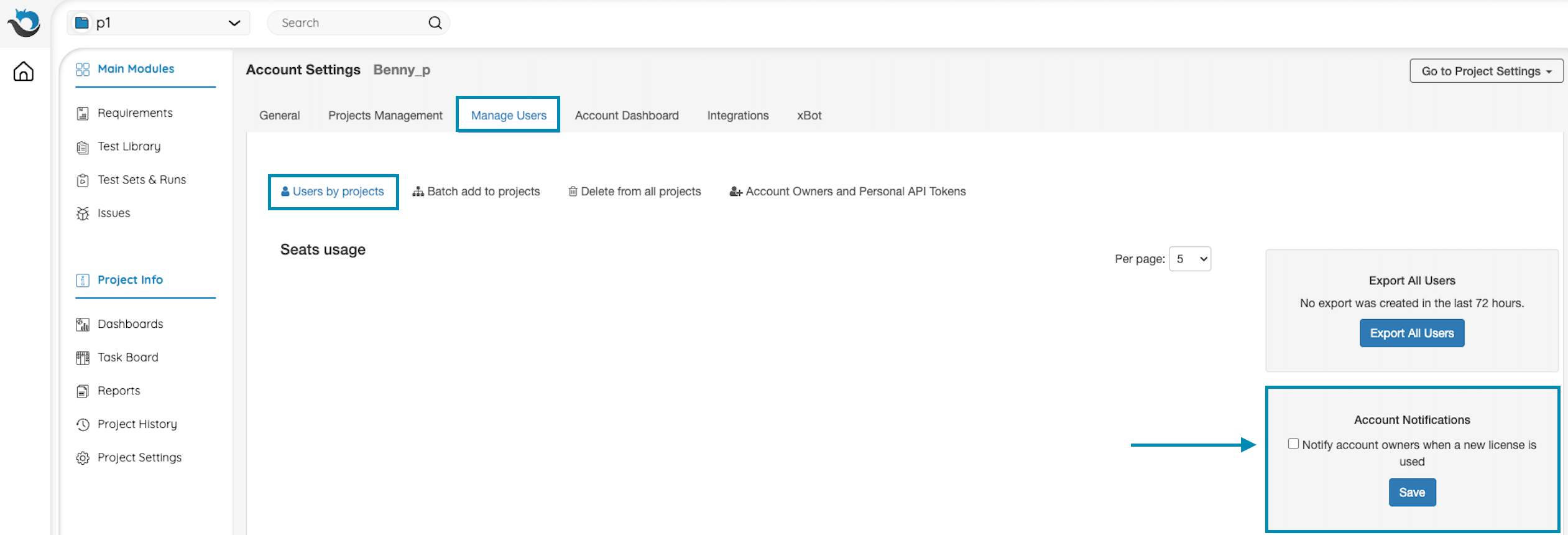
Adding New Users Notifications
As the account owner, you can receive an email notification whenever a new license user is added to your account by a project admin. This is only available for Ultimate or Corporate accounts. Read more about Users management here.
Coming up
-
Last Chance to Save Your Spot at the 2023 OnlineTestConf!
This is your final opportunity to secure your spot at our exclusive virtual software testing conference. Sign up today and ensure you’re not left out!
November 13th-14th, 10:00 EST / 16:00 CET -
PractiTest Live Training
Join our customer success team and ask everything you want to know.
Wednesday, November 8th, 10:00 EST / 16:00 CET
Sign up here
Can’t make it?
Join us on Wednesday, November 22nd, 2:00 PM EST / 20:00 CET
PractiTest and Beyond
-
PractiTest Named in the 2023 Gartner® Quick Answer: How Should We Test Enterprise SaaS Applications report
We’re delighted to announce that PractiTest has been mentioned in the Test Management category for use cases related to “Utilize traceability, communication integrations and reporting facilities to notify teams on software quality”.
Read the PR here. -
Boost Your Expertise with PractiTest Certification!
Calling all PractiTest users! Get certified as a PractiTest expert. Get more out of your software testing process and master the platform. After successfully completing the course, you’ll earn a certified PractiTest user badge to share online.
Click here to start the course.