Share the article 

Test Value Score is an AI and Machine Learning based capability that evaluates the contribution and significance of each test within your testing process. Each test receives a score between 0 and 100, calculated based on multiple factors. The score gives teams an objective, data driven view of how valuable a test is to their project.

By using Value Score, test architects and managers gain a clearer understanding of which tests provide meaningful coverage, expose risk, or surface issues, and which tests may require review or improvement. This allows teams to make better tactical and strategic decisions regarding their testing efforts.

Note: This feature is available only for Corporate Licenses.

How Test Value Score Is Calculated

The score is based on a combination of machine learning and heuristics that evaluate several attributes of the test, including:

  1. Run Status History and Fluctuations: Tests that consistently pass or consistently fail receive a lower score. Meaningful variation in run history increases the test’s value.
  2. Linked Issues: Tests with linked issues demonstrate meaningful coverage and may increase the score.
  3. Test Set Coverage: Tests executed across multiple test sets are treated as more impactful.
  4. Steps: Tests with well structured, clear, and complete steps receive a higher score.
  5. Multiple Executing Testers: Tests executed by different testers carry more validation diversity, contributing positively to the score.
  6. Recent Comments: Tests that include comments are considered more relevant and may increase score.

Note: Tests with less than 2 runs will not receive a score (NA). To receive an initial Test Value Score, a test must have at least 2 runs executed on 2 different days.

Enabling Value Score

To enable Test Value Score for your project:

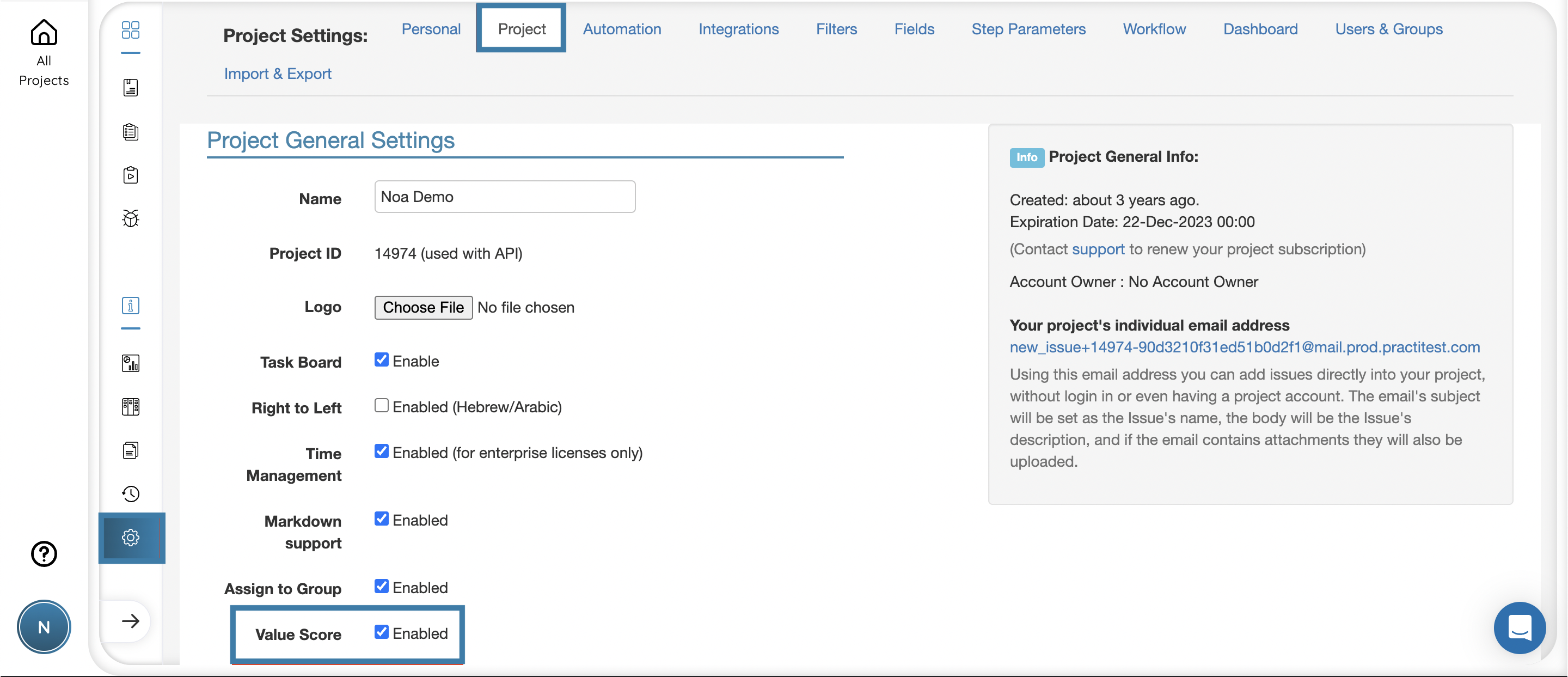
  1. Go to Project Settings
  2. Tick the checkbox next to Value Score
enable value score in project settings

Viewing the Score in the Test Library

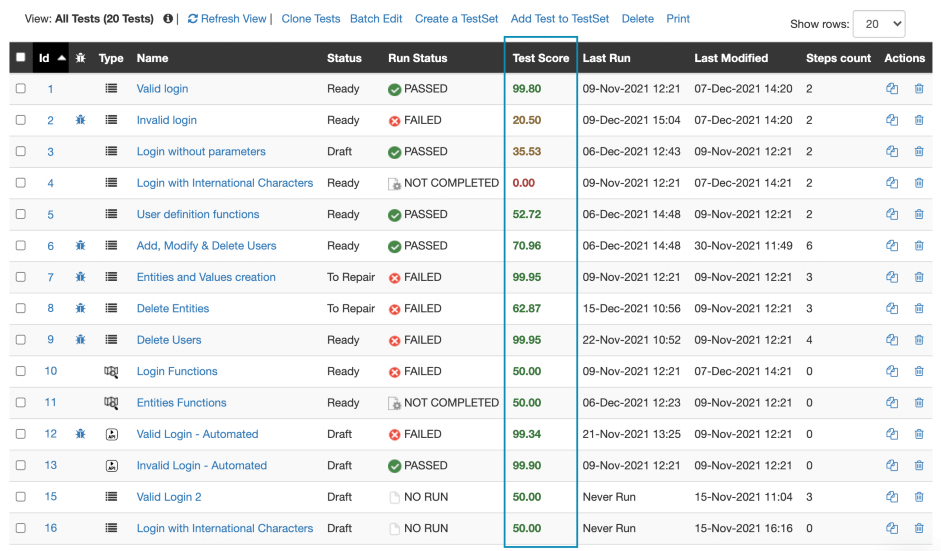
After activation, each test in the Test Library will display its score in the grid. The score ranges from 0 to 100 and updates automatically as new data becomes available, such as additional runs or changes that influence the scoring factors.

Tests with insufficient historical data will show “NA”, meaning there isn’t yet enough information to calculate a reliable score. To receive an initial Test Value Score, a test must have at least 2 runs executed on 2 different days. As tests continue to be executed and more activity accumulates, the score will appear and keep updating based on ongoing data.

value score in test library

Viewing the Score Inside a Test

Inside the test form, a dedicated Value Score component appears on the top right side. This component is collapsed by default and displays the test’s score. Expanding the panel reveals:

  • A list of all contributing factors. 
  • Whether each factor increases (green) or decreases (red) the score
  • Real time updates based on changes you make to the test or its activity

All future changes that affect these factors will automatically update the score.

value score component in test screen

Providing Feedback on Score Accuracy

Next to the score, you’ll find a thumbs up and thumbs down button. This allows you to provide quick feedback on whether the score feels appropriate for the test. These responses help us improve the scoring model over time.

value score feedback

Shift your testing Forward