

In an industry that demands both speed and quality, the role of the QA team is more important, and sometimes more misunderstood, than ever. While QA has traditionally been viewed as a checkpoint near the end of the Software Development Lifecycle, today’s software testing teams are expected to drive business value from day one.
One of QA’s most critical contributions is providing visibility into product quality and accurate estimations of project timelines. As simple as it may sound, this has a direct impact on higher-level company priorities and overall business success.
In this article, we’ll explore how QA teams can better align with business goals, design smarter strategies, collaborate more effectively, and overcome the most common obstacles to delivering real impact.

Understanding the Business Goals of QA Teams
As the software industry has evolved over the past decade, so has the role of QA. Once viewed as a “black hole” at the end of the software development lifecycle that delayed releases, QA is no longer an isolated activity, and most certainly not a bottleneck. In today’s software world that is full of challenges such as growing customers’ needs or new regulations, the business criticality of software testing has never been greater.
Beyond uncovering bugs, software testing is about ensuring that every release aligns with user needs, reducing costly surprises after deployment, and prioritizing efforts based on risks and impact. This shift means QA must be embedded earlier in the process, communicate continuously with development and product teams, and make decisions that balance technical quality with business value.
Modern business quality assurance aligns with goals such as:
- Reducing production incidents and post-release issues
- Supporting faster, safer release cycles
- Ensuring regulatory and compliance readiness
- Enhancing user experience and product stability
- Contributing data for informed decision-making
Building an Efficient QA Strategy for Your Team
An effective QA team contributes to how products are delivered, how risks are managed, and how confident the organization can be in each release. To do that, your QA strategy needs to be clear, adaptable, and aligned with both technical and business goals.
Key elements of an efficient QA strategy include:
Aligning with development goals
The software testing team should stay closely connected to product managers and developers. Understanding what matters most in each release allows QA to focus on high-risk, high-impact areas and contribute directly to business outcomes.
Prioritizing based on risk
Risk assessment has become a key part of a software tester’s work. Not every feature is equally critical, and a risk-based approach helps the team allocate time and resources where they are needed most. This reduces the chances of major defects making it into production.
Balancing automation with manual testing
Automation is essential for speed and consistency, but manual testing remains important in areas where human judgment is needed, such as exploratory testing. A smart mix of both allows teams to maintain quality while staying flexible.
Using metrics to close the loop
Track KPIs that reflect meaningful progress, such as escaping defect rate, bug re-open rate, and even Net Promoter Score (NPS). Be cautious with overly simple metrics (e.g., how many tests have we executed) that don’t capture the full context, and focus instead on data that improves decision-making and future planning.
Collaboration: The True Power of QA Impact
One of the most significant shifts in software testing is the distribution of responsibility for quality. Where quality was once seen as the sole responsibility of the QA team, it is now a shared effort involving testers, developers, product managers, and even business analysts. The ability to deliver real business value depends heavily on collaboration, which can be broken down into two main types: cross-functional and internal.
Cross-functional Collaboration
Software testing teams are often the drivers of the quality mindset, bringing a customer-centered perspective to the development process. But, since quality should not live in QA alone, it’s critical that this mindset is shared by the other teams who work closely with developers, product managers, business analysts, and more. That’s why promoting quality across roles and fostering strong cross-functional collaboration is not just helpful, it’s essential to the success of the product.
QA needs to be part of early conversations about feature scope, technical constraints, and customer expectations. But it doesn’t stop here. Even after a release, the team should work closely with developers regarding bugs, writing clear documentation, and getting feedback on how to improve the next release cycle.
Internal-team Collaboration
But there is another side of collaboration that sometimes gets overlooked: the day-to-day coordination between QA team members working on the same project and the same test cases.
Without proper tooling, this internal collaboration can become messy. With hundreds or thousands of tests, user stories, and defects, it’s easy to step on each other’s toes. Multiple people may update the same item without knowing it, overwrite data, or waste time trying to figure out which version is the most recent. These issues are even more common in distributed or offshore teams, where time zone gaps and lack of real-time visibility make coordination harder. Small inefficiencies like these add up quickly, slowing down the team and reducing confidence in the process.
That’s why we introduced Collaborative Editing in PractiTest. This capability allows multiple team members to view and edit the same entity in real time, and still avoid data conflicts. You can immediately see who else is viewing the same item as you, whether they are actively working on it, and if they have made changes and you are not working on the most updated data.
If that happens, you’ll be prompted to pull the new changes before continuing. In case of overlapping edits, a simple conflict resolution screen appears, letting users choose whether to keep their version or accept the latest update.
This kind of real-time collaboration allows QA teams to work together with more confidence and less friction, especially in distributed environments or fast-paced development cycles.

Challenges in Maximizing QA Impact
Even well-structured QA teams run into friction that limits their ability to truly influence business outcomes. These challenges don’t always appear on the surface, but they directly affect release quality, timelines, and team confidence.
Here are some of the most relevant blockers modern QA teams face:
#1 Fragmented tools and disconnected systems
QA processes often span multiple tools such as test management platforms, bug trackers, and automation frameworks. Without end-to-end traceability or a shared source of truth, testers waste valuable time switching contexts, manually syncing data, and chasing information. This slows down delivery and increases the risk of misalignment.
To overcome this, select tools that integrate seamlessly with each other and allow for easy data transfer. Reducing friction between systems helps QA stay focused on testing, not tool management.
#2 Delays caused by unclear ownership
When multiple team members work on the same tests, requirements, or bugs without coordination, it’s easy for changes to be lost, overwritten, or duplicated. Without clear visibility into who owns what, teams face delays, confusion, and unnecessary rework.
To minimize these risks, make ownership visible and explicit. Use a centralized test management platform that allows you to assign tasks clearly, track changes, and document ownership transitions. This not only helps avoid duplication and miscommunication, but also makes it easier for others to pick up where someone else left off, keeping momentum and accountability intact.
#3 Overload and prioritization challenges
QA teams are often expected to test everything. But time, resources, and capacity are always limited. Without clear prioritization, teams risk spreading themselves too thin, spending time on low-impact areas while missing critical issues that truly affect business outcomes.
To avoid this, QA managers should work closely with product and development leads to align on what matters most in each release in order to clarify business goals, feature importance, and areas of high risk. From there, QA should conduct a risk assessment to identify which features, components, or flows pose the greatest potential impact if something goes wrong.
But, don’t forget to evaluate whether the risk-based approach was effective after the testing cycle ends. Did the areas we prioritized surface more critical defects? Were there any high-severity issues missed in areas considered low risk? These insights help QA teams continuously improve their prioritization process and become more strategic with every release.
#4 Limited visibility into quality trends
Without clear visibility into testing activities, progress, and outcomes, QA teams can’t confidently say what went well, what needs improvement, or where risks still remain. This lack of insight makes it difficult to adjust during a cycle or to learn from one release to the next.
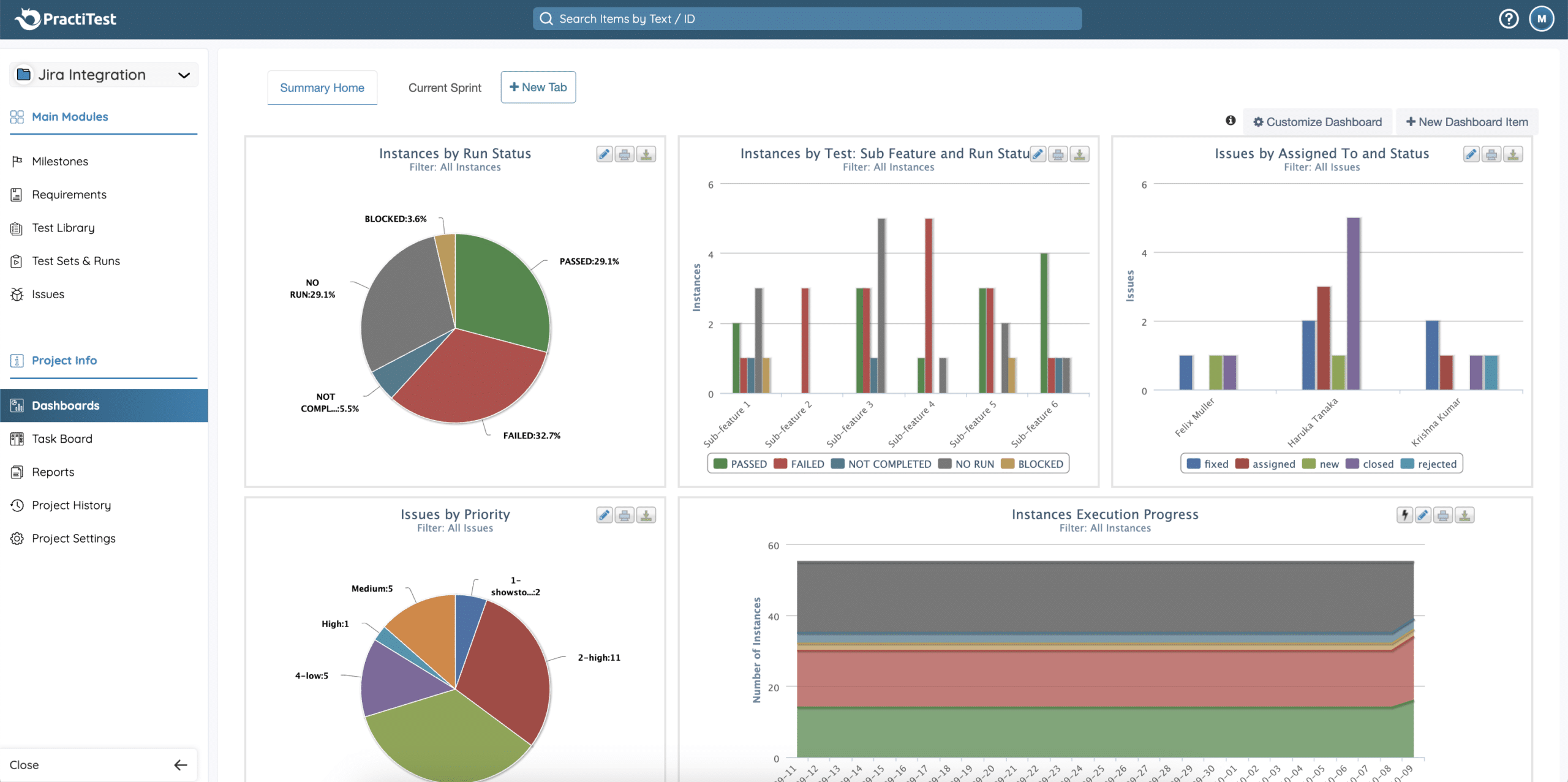
To solve this, QA needs access to real-time dashboards that provide a high-level view of testing efforts. A robust test management platform should let teams track execution progress, categorize defects by severity or type, and slice data based on components, milestones, or other relevant fields. For deeper analysis, teams should also rely on comprehensive reports that allow them to drill down into the data.
Final Thoughts: QA’s Role in Driving Business Value
As software becomes more central to how companies operate and compete, software development QA must evolve into a more strategic, collaborative, and data-driven function. It’s not just about testing for the sake of testing, it’s about helping the business move faster, with greater confidence and less risk.
By aligning QA efforts with business goals, building smart and adaptable strategies, and investing in real-time collaboration, teams can unlock the full potential of business quality assurance. That means faster releases, better decisions, improved customer experiences, and a QA team that isn’t just supporting the business but actively shaping its success.Want to experience what modern QA collaboration looks like in practice? Start your free trial of PractiTest and try Collaborative Editing in action.
FAQ
What are the best metrics to track for measuring QA’s business impact?
To measure QA’s contribution to business outcomes, focus on metrics that go beyond raw test execution. Useful indicators include:
- Escaped defect rate
- Defect severity distribution
- Planned vs. executed test coverage
- Cycle time for defect resolution
- Risk assessment effectiveness
- Bug re-open rate
These metrics help show how QA efforts reduce risk, improve product stability, and support more confident releases.
How can automation tools enhance the efficiency of QA teams?
Automation tools reduce manual overhead by speeding up repetitive tasks like regression testing and smoke tests. This allows testers to focus on higher-value work such as exploratory testing and risk-based analysis. When integrated into a centralized test management platform, automation also improves traceability, visibility, and consistency across the software development QA process.
How can QA teams contribute to faster time-to-market?
QA contributes by preventing issues early, prioritizing effectively, and reducing rework late in the cycle. Practices like shift-left testing, real-time collaboration, and risk-based test planning help identify critical defects sooner and streamline the release process. By focusing on what matters most and staying closely aligned with product and development teams, QA enables faster, safer, and more predictable releases.