
OpenText Quality Center (formerly HP ALM/Quality Center) has been a cornerstone of enterprise test management for decades. Its comprehensive approach to application lifecycle management, with robust requirements traceability, structured test planning, and detailed defect tracking, has made it the go-to choice for large organizations, especially those in regulated industries where audit trails and compliance documentation are non-negotiable.
But as software development practices evolve toward Agile and DevOps methodologies, many QA teams find themselves wrestling with Quality Center’s legacy architecture. The dated user interface, steep learning curve, high licensing costs, and rigid workflows that once represented enterprise-grade rigor now often feel like obstacles to the speed and flexibility modern teams need.
That’s where this guide comes in. Whether you’re looking to:
- Escape Quality Center’s complexity with a more intuitive, modern interface
- Reduce total cost of ownership without sacrificing essential test management capabilities
- Gain better integration with Agile tools like Jira
- Leverage AI-powered features to accelerate test design and prioritization
- Support DevOps and CI/CD pipelines with native automation integration
- Deploy a cloud-native solution without on-premise infrastructure overhead
- Access responsive customer support when you need help
We’ll explore dedicated alternatives that excel in these specific areas.
Some organizations might use these tools to complement their existing Quality Center setup during a gradual transition, while others might replace Quality Center entirely. This isn’t about finding a universally “better” platform; it’s about finding the right fit for your team’s specific needs, technical environment, and growth trajectory.
Let’s dive into the Quality Center alternatives and see which ones might be the perfect fit for your QA organization.
The Best TestRail Alternatives
 | Starts at: $49/user/mo G2 Score: 4.3 Capterra Score: 4.9 | PractiTest Best Alternative for Comprehensive Test Management with Excellent Support We chose PractiTest because it delivers end-to-end test management with exceptional customer support, deep Jira integration, and mature AI-powered features refined over two years, all in a highly customizable platform built for enterprises managing complex test suites across multiple teams and tools. |
 | Starts at: $38/user/mo G2 Score: 4.4 Capterra Score: 4.3 | TestRail Best Alternative for Small Teams Seeking Simplicity We chose TestRail because it offers intuitive test case management with a relatively shallow learning curve, making it suitable for smaller teams that have outgrown spreadsheets but don’t need Quality Center’s full ALM complexity or enterprise-scale capabilities. |

| Starts at: Custom Quote G2 Score: 4.0 Capterra Score: 4.4 | ALM Octane (OpenText Software Delivery Management) Best Alternative for Agile and DevOps Transformation We chose ALM Octane because it’s OpenText’s official modern successor to Quality Center, purpose-built for Agile and DevOps with native CI/CD pipeline integration while maintaining enterprise-grade governance. |
 | Starts at: Custom Quote G2 Score: 4.1 Capterra Score: 3.5 | Zephyr Enterprise Best Alternative for Jira-Centric DevOps Teams We chose Zephyr Enterprise because it offers standalone test management with deep multi-Jira instance consolidation, making it ideal for large enterprises with distributed Atlassian deployments. |

| Starts at: Free G2 Score: N/A Capterra Score: N/A | Kiwi TCMS Best Alternative for Budget-Conscious Teams We chose Kiwi TCMS because it’s a popular open-source test management system, offering a genuinely free option for teams that cannot justify Quality Center’s substantial licensing costs. |
 | Starts at: $24/user/mo (annual) G2 Score: 4.7 Capterra Score: 4.8 | Qase Best Alternative for Growing Teams Seeking Modern Test Management We chose Qase because it offers a clean, modern interface with AI-powered test creation at transparent pricing, making it accessible for small to mid-sized teams wanting to escape legacy tool complexity. |

| Starts at: $99/mo (10 users) G2 Score: 4.7 Capterra Score: N/A | Testmo Best Alternative for Modern Unified Test Management We chose Testmo because it unifies manual, exploratory, and automated testing in a lightning-fast interface built by former TestRail founders who left to create a fresh architecture without legacy constraints. |
What is Quality Center?
OpenText Quality Center (also known as Application Quality Management or ALM) is a comprehensive software suite for managing the entire application development and testing lifecycle. Originally developed as Mercury TestDirector and subsequently owned by HP, HPE, and Micro Focus before becoming part of OpenText, Quality Center has been widely regarded as a dominant player in enterprise test management for decades.

Its key capabilities include:
- Requirements Management: Define, organize, and track project requirements with hierarchical structures and version control
- Test Plan Module: Create and manage test cases in structured hierarchies with support for manual and automated tests
- Test Lab: Execute tests, manage test sets, and track results with detailed logging
- Defects Module: Log, assign, track, and manage defects throughout the resolution lifecycle
- Dashboard and Analysis: Generate comprehensive reports and visualize project data with customizable graphs
- End-to-End Traceability: Link requirements to tests and defects for complete audit trails
- Risk-Based Quality Management: Assess business criticality and failure probability to prioritize testing efforts
Quality Center’s architecture connects all these components into a unified platform where requirements flow into test cases, test execution generates defects, and everything maintains bi-directional traceability. This comprehensive approach has made it particularly valuable for regulated industries like finance, healthcare, and pharmaceuticals, where compliance documentation and audit trails are mandatory.
However, Quality Center’s strengths come with trade-offs. Users frequently cite its outdated interface, steep learning curve, high licensing costs, and sometimes sluggish performance. As development practices shift toward Agile and DevOps, many teams find Quality Center’s structured, waterfall-oriented workflows less aligned with modern methodologies.

Source: Stack Overflow
Looking for comprehensive test management with modern UI, excellent support, and proven AI capabilities? Explore how PractiTest delivers end-to-end QA orchestration for enterprises managing complex test suites across multiple teams and tools.
How We Curated Our List of Quality Center Alternatives
After analyzing Quality Center’s capabilities and researching the test management market, we identified specific areas where teams often need solutions that better match their particular requirements. While Quality Center excels at enterprise-scale governance and compliance documentation, many organizations need tools that offer:
- Modern, intuitive interfaces that don’t require weeks of training
- Transparent, accessible pricing without enterprise-level custom quotes
- Native integration with Agile tools, especially Jira
- AI-powered features to accelerate test design and prioritization
- Cloud-native deployment without on-premise infrastructure requirements
- Responsive customer support with fast resolution times
- Support for DevOps workflows and CI/CD pipelines
Each platform on this list addresses one or more of these needs as a leader in its specific category. We’ve focused on alternatives that represent distinct approaches to test management, from enterprise-grade comprehensive platforms to budget-friendly open-source options.
| ❗DISCLAIMER: We aren’t covering every test management tool on the market! Our focus is on highlighting the best alternatives that address Quality Center’s limitations for specific use cases, team sizes, and organizational needs. |
|---|
1. PractiTest: Best Alternative for Comprehensive Test Management with Excellent Support

PractiTest is an end-to-end, cloud-based test management platform designed to centralize and streamline the entire QA process. Founded in 2008 by three entrepreneurs (including a QA thought leader), PractiTest serves as a unified hub for managing requirements, test cases, test execution, issues, and reporting, all within a single modern interface. Its key capabilities include:
- End-to-End Test Modules: Integrated Requirements, Test Library, Test Sets & Runs, Issues, and Milestones management with complete traceability
- SmartFox AI Assistant: AI-powered test management with three core capabilities: smart test generation, duplication guardian for detecting similar existing tests, and execution strategist for intelligent test prioritization

- Deep Jira Integration: Seamless two-way synchronization with Jira including a dedicated panel within Jira showing test status, issues, and coverage
- Dynamic Filtering: Flexible, hierarchical filters with custom fields enabling instant “slice and dice” access to any subset of tests
- Advanced Reporting: Separate engines for dashboards and reports with external embedding capabilities, scheduled delivery, and historical versioning
- Data Independence: Full data portability with all information stored within PractiTest, ensuring testing history remains intact regardless of external tool changes
- Migration Tools: Built-in migration support from TestRail, qTest, HP ALM/Quality Center, and other platforms
For enterprises managing thousands of tests across multiple teams, locations, and tools, PractiTest delivers a centralized quality assurance hub that doesn’t lock you into any single ecosystem.
Why Choose PractiTest Over Quality Center for Comprehensive Test Management
While Quality Center offers extensive functionality, PractiTest excels in areas that modern enterprise QA teams increasingly prioritize: multi-tool integration flexibility, support quality, business impact traceability, and mature AI-powered efficiency.
Customer Support: Responsive Help When You Need It
One of the most consistent themes in PractiTest user reviews is the exceptional quality of customer support. Users describe the support team as “responsive,” “prompt,” and “helpful,” with quick turnaround times through email, web support, and in-app chat. The company is noted for being receptive to feedback, with instances of feature requests from relatively small accounts being implemented.

Source: G2
Quality Center, by contrast, relies on OpenText’s enterprise support structure, which can involve longer resolution times and tiered access. For teams without dedicated administrators who need quick answers to keep testing moving, PractiTest’s support model offers a significant advantage.
⚡ PractiTest in Action: When your team encounters a configuration question during a critical release cycle, you can reach out via in-app chat and often receive quick responses. Support staff don’t just provide answers; they often share best practices and help optimize your workflows based on how other successful teams use the platform.
Dynamic Filtering: Escape Rigid Folder Structures
Quality Center organizes tests and requirements in static folder hierarchies. This approach becomes cumbersome as projects grow, forcing teams to duplicate items or navigate complex trees to find what they need. PractiTest replaces folders with a tag-based system using custom fields and dynamic filters.
This “slice and dice” capability means a single test can appear in multiple filtered views without duplication. Need to see all high-priority regression tests for a specific component assigned to a particular tester? Create a filter. Want to track tests by sprint, feature, and test type simultaneously? Stack filters. You can instantly find all regression tests that are ready, all automation tests for Sprint 15, or any combination of criteria without reorganizing data.
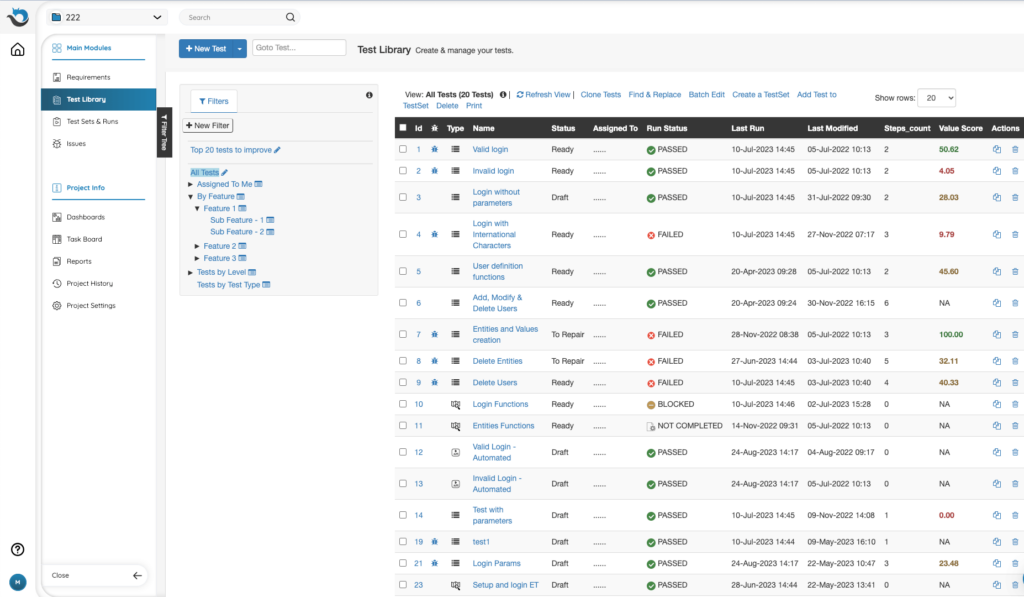
⚡ PractiTest in Action: Instead of clicking through nested folders to find regression tests for your payment module, you create a filter combining “Test Type = Regression” + “Component = Payments” + “Sprint = Current.” The view updates instantly, and you save it for one-click access. When organizational needs change, you modify the filter rather than reorganizing hundreds of items.
SmartFox AI: Proven Capabilities Refined Over Two Years
Quality Center is adding AI features through its Aviator technology, but these are tied to SaaS deployments and require separate subscriptions. PractiTest’s SmartFox AI assistant represents two years of market testing and refinement, offering mature, comprehensive solutions with three distinct capabilities addressing different testing challenges:
- Smart Test Generation: Automatically generate test steps based on a test’s name and description, dramatically reducing the manual effort of writing detailed test cases. SmartFox can also enhance existing test steps by expanding them for clarity, shortening them for conciseness, or refining text.
- Duplication Guardian: When creating new tests or issues, SmartFox alerts you to similar existing items in your repository. This prevents redundant test creation and helps maintain a clean, efficient test library as your suite grows.
- Execution Strategist (Test Value Score): Analyzes execution history, run frequency, and defect discovery rates to identify which tests provide the most value. The system suggests which tests to run, skip, or retire based on their actual effectiveness at finding defects.
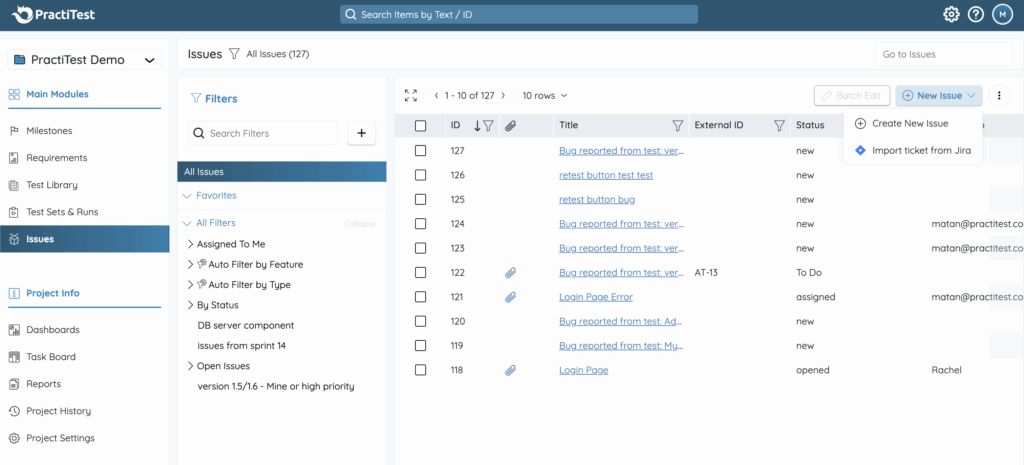
⚡ PractiTest in Action: You create a new test case titled “Verify user login with valid credentials.” SmartFox immediately alerts you that three similar tests already exist, preventing duplication. For a genuinely new test, it generates complete test steps covering navigation, credential entry, form submission, and verification. Later, before a regression run, the Execution Strategist identifies that 15% of your tests have never found defects and suggests retiring them, while highlighting high-value tests that should always run.
Deep Jira Integration: Beyond Basic Two-Way Sync
While Quality Center offers Jira integration through connectors, users sometimes find these integrations less seamless than desired. PractiTest provides robust two-way synchronization with Jira that goes beyond basic data exchange.

PractiTest automatically syncs custom filters from Jira and provides real-time updates when those filters change. A dedicated panel directly within the Jira UI shows the status of tests, issues, and coverage without leaving Jira. Requirements and issues flow bidirectionally between the platforms, and testers can report defects from failed test runs directly into Jira with automatic linking that maintains complete traceability.
Critically, PractiTest can connect multiple tools (Jira, ClickUp, Azure DevOps) into a unified testing view. Different projects within the same account can use different bug trackers, providing flexibility that enterprises with diverse team tooling requirements need.
⚡ PractiTest in Action: Your development team manages user stories in Jira while another division uses Azure DevOps. Both sync automatically to PractiTest as requirements. Your QA team links test cases to these requirements and executes tests from a single platform. When viewing any Jira issue, developers see the PractiTest panel showing exactly which tests cover that story and their current status, keeping everyone aligned without manual updates or context-switching.
Business Impact Traceability: Connect Testing to Business Value
Quality Center provides traceability from requirements to tests to defects. PractiTest extends this into a closed-loop system that connects testing directly to business value with impact analysis beyond basic artifact linking.
When a bug is found, you can immediately identify which requirements are affected, what tests cover those requirements, and the business impact of rolling back features. This enables data-driven conversations about release readiness that go beyond pass/fail metrics.

⚡ PractiTest in Action: A critical defect is discovered in the payment processing module. Within seconds, you trace which requirements are affected, see that three other features depend on that module, and identify the business impact if those features ship with the bug versus rolling back the release. This analysis, impossible to perform quickly in disconnected tools, enables informed go/no-go decisions.
Data Independence and Migration Support
Quality Center’s architecture means your testing data lives within its ecosystem. PractiTest maintains full data portability and independence, storing all data within the platform even when synced with external tools. If you change issue trackers or project management tools, your complete testing history remains intact.
For teams migrating from Quality Center, PractiTest provides migration tools specifically designed for HP ALM/Quality Center, TestRail, qTest, and other platforms. This reduces switching costs and risk for enterprises considering a platform change.
PractiTest Pricing
PractiTest uses a subscription-based, per-user pricing model with two main tiers:

Team Plan: $49/user/month
- Minimum 5 testers license pack
- Includes 5 Comment Users per license
- Unlimited projects
- All core modules (Requirements, Test Library, Test Sets & Runs, Issues, Milestones)
- Advanced dashboards and reports with external embedding
- AI SmartFox Assistant (all three capabilities)
- Single two-way issue integration (Jira, Azure DevOps, etc.)
- REST API for automation integration
- SAML 2.0 SSO and MFA
- Standard support
Corporate Plan: Custom Quote
- Minimum 10 licenses (yearly billing only)
- Everything in Team Plan, plus:
- 10 Comment Users per license
- Multiple two-way integrations
- Multiple account owners
- MFA enforcement and advanced security
- Global test repository
- Audit log
- Premium support with dedicated customer success
- Concurrent licensing option available
A free trial is available for the Team Plan.
Who Should Use PractiTest?
Choose PractiTest if:
- You’re an enterprise managing thousands of tests across multiple teams, locations, and tools. PractiTest delivers a centralized quality assurance hub that doesn’t lock you into any single ecosystem. While its robustness requires more initial configuration than simpler tools, this complexity becomes necessary and valuable at enterprise scale.
- Excellent customer support is a priority for your team. If you’ve struggled with slow enterprise support responses and need a vendor that treats your questions seriously regardless of account size, PractiTest’s consistently praised support team makes a tangible difference.
- You need to integrate multiple tools without vendor lock-in. PractiTest’s deep integrations with Jira, Azure DevOps, ClickUp, and others let you maintain a unified testing view while using different tools across projects. Full data independence ensures your testing history survives any tooling changes.
- You want proven AI capabilities that address multiple testing challenges. SmartFox’s three distinct AI features (test generation, duplication detection, and execution prioritization) represent two years of refinement, enabling data-driven decisions about where to focus testing efforts.
- You’re migrating from Quality Center and need a smooth transition. Built-in migration tools for HP ALM/Quality Center, TestRail, and qTest reduce switching risk and preserve your testing investment.
Ready to experience comprehensive test management with support that actually supports you? Start your PractiTest free trial and see how modern QA orchestration should work.
2. TestRail: Best Alternative for Small Teams Seeking Simplicity

TestRail is a web-based test case management tool that provides a centralized platform for managing, tracking, and organizing software testing efforts. Created by Gurock Software in 2010 with an explicit philosophy of building powerful tools with user-friendly interfaces, TestRail was later acquired by Idera, Inc. in 2016 and has become one of the most widely adopted tools in the test management space. Its key capabilities include:
- Intuitive Interface: Clean design that users consistently describe as having a relatively shallow learning curve
- Built-In Templates: Pre-configured test case templates including Text, Steps, Exploratory Session, and BDD formats
- Jira Integration: Two-way integration allowing defect pushing and direct issue editing within TestRail
- Customizable Reports: Real-time dashboards with drill-down capabilities and forecasting based on historical execution times
- Flexible Deployment: Available as cloud-hosted (AWS) or on-premise installation

For smaller teams that have outgrown spreadsheets but don’t need comprehensive ALM capabilities, TestRail offers focused test management with a gentle learning curve.
Why Choose TestRail Over Quality Center for Simpler Test Management
TestRail stands out in several key areas that benefit smaller teams seeking simplicity:
- Faster Time-to-Value for Simple Needs Quality Center requires substantial setup and training before teams become productive. TestRail’s interface is designed for immediate usability with built-in templates that allow productive testing within days. The logical hierarchy of projects, test suites, sections, and test cases mirrors how testers naturally think about organizing their work.
- Focused Feature Set TestRail concentrates on test case management and execution tracking. It lacks native requirements and issues modules, which means teams typically use it alongside Jira for requirements and defects. For small teams already centered on Jira who need only a dedicated testing layer, this focused approach avoids unnecessary complexity.
- Modern Web-Based Experience While Quality Center carries architectural baggage from its TestDirector origins, TestRail was built as a modern web application from the start. Its REST-style API with JSON data exchange integrates cleanly with modern DevOps toolchains.
Architectural Consideration: TestRail uses a traditional folder structure for organizing tests, requiring users to navigate through hierarchical folders. This works well for smaller test suites but can become cumbersome as test volumes grow into the thousands. Teams anticipating significant growth should evaluate whether folder-based organization will scale with their needs.
🏅 NOTE: We also evaluated Testpad and TestLodge. Testpad excels at its checklist-style approach for lightweight testing needs, and TestLodge offers notable simplicity at budget pricing. TestRail represents a widely-adopted option for teams wanting simple test management. However, TestRail lacks native requirements and issues modules; teams needing integrated requirements-to-defects traceability in one platform should evaluate more comprehensive alternatives like PractiTest.
TestRail Pricing
TestRail pricing is structured as follows:

Professional Plan: $38/seat/month
- Unlimited projects, test cases, and suites
- AI-Generated Test Cases and BDD Scenarios
- Defect and requirements integrations
- Role-based access control
- 180 API requests/minute, 50 GB storage
- Standard support
Enterprise Plan: $78/seat/month (yearly only)
- Everything in Professional, plus:
- Cross-project reporting and test case versioning
- Single sign-on (SSO) and advanced auditing
- Automatic daily backups (Cloud)
- 300 API requests/minute, 500 GB included storage (expandable)
- Priority support with 2-hour response SLA
On-Premise Deployment: Minimum 10 seats, 12-month contract; contact sales for pricing.
Who Should Use TestRail?
Choose TestRail if:
- Your primary need is test case management without integrated requirements or defect tracking. TestRail excels at managing tests, test runs, and results. If you already use Jira for requirements and defects and need only a dedicated testing layer, TestRail’s focused approach avoids unnecessary complexity.
- You’re a small team (around 5 users) seeking simplicity. For teams who need structure without enterprise-scale capabilities, TestRail provides a middle ground between spreadsheets and comprehensive ALM.
- Quick onboarding matters and you lack dedicated administrators. If your QA team doesn’t have tool specialists and needs testers productive quickly, TestRail’s minimal learning curve delivers immediate value.
Consider alternatives if: You anticipate significant growth, need native requirements management, require integration with multiple tools beyond Jira, or want complete data independence from your issue tracker.
3. ALM Octane: Best Alternative for Agile and DevOps Transformation

ALM Octane is OpenText’s web-based application lifecycle management platform engineered specifically for organizations adopting Agile and DevOps practices. Unlike Quality Center, which adapted over time from waterfall origins, ALM Octane was designed from the ground up for modern software development when it was first released in 2016. Its key capabilities include:
- Native CI/CD Pipeline Integration: Direct integration with Jenkins, TeamCity, Bamboo, Azure DevOps, and GitLab with a dedicated “Pipelines” module
- Agile Framework Support: Built-in support for Scrum, Kanban, and Scaled Agile Framework (SAFe) with backlog management and sprint planning
- Quality Gatekeeping: Release process definitions with stages, actions, and quality gates for enforcing standards
- Flexible Deployment: Available as SaaS (99.9% uptime SLO), on-premises, private cloud, or Docker containerized

For organizations invested in the OpenText ecosystem seeking to modernize from Quality Center while maintaining vendor continuity, ALM Octane represents the official upgrade path.
Why Choose ALM Octane Over Quality Center for Agile/DevOps
ALM Octane addresses several fundamental Quality Center limitations:
- Purpose-Built Architecture for Agile and DevOps Quality Center’s architecture remains oriented toward traditional waterfall methodologies despite adaptations. ALM Octane’s Backlog Management module supports hierarchical structures of epics, features, user stories, and defects with flexible ranking methods including Weighted Shortest Job First (WSJF) for SAFe implementations. Sprint planning, team velocity tracking, and board/list views are native rather than workarounds.
- Native CI/CD Pipeline Management Quality Center’s integrations with modern tools are often described as “less seamless.” ALM Octane’s Pipelines module integrates directly with CI/CD servers via installable plugins, providing graphical pipeline visualization, drill-down to build logs, code coverage analysis with JaCoCo/LCOV/SonarQube, and security vulnerability tracking from Fortify.
- Modern Web Interface While Quality Center’s web client addresses some legacy UI concerns, ALM Octane was designed as a modern web application from inception. It includes personalized “My Work” lists, customizable dashboards with configurable widgets, IDE integrations, and Slack/Teams integrations for notifications.
🏅 NOTE: We also evaluated Azure DevOps and Polarion. Azure DevOps offers broader project management with strong CI/CD and Git hosting. Polarion provides powerful requirements management, particularly for automotive and embedded systems. ALM Octane offers the vendor-supported migration path for Quality Center customers due to the shared OpenText relationship and familiar enterprise-grade governance.
ALM Octane Pricing
ALM Octane uses quote-based pricing, typically requiring contact with OpenText sales. License editions include:
Pro Edition (For Independent Teams)
- Per-user subscription (named or concurrent)
- Backlog management, defect management, DevOps pipeline management
- Quality management, manual/automated testing
- Cross-release planning and advanced analytics
Enterprise Edition (For Large Organizations)
- Everything in Pro, plus:
- Shared customization across workspaces
- Cross-workspace reporting
- Data access controls
- Free trial available
Developer License (Add-on): Lower-cost access for developers with subset functionality.
Who Should Use ALM Octane?
Choose ALM Octane if:
- You’re invested in the OpenText/Micro Focus/HP ecosystem. Organizations using UFT, LoadRunner, or Quality Center will find native integrations and potential shared licensing advantages.
- You need enterprise-grade CI/CD pipeline visibility alongside test management. Teams requiring real-time visibility into Jenkins, TeamCity, or Azure DevOps pipelines with integrated test results benefit from ALM Octane’s Pipelines module.
- You’re migrating from Quality Center and want vendor continuity. Organizations preferring single-vendor support during ALM modernization will find ALM Octane positioned as the natural evolution.
4. Zephyr Enterprise: Best Alternative for Jira-Centric DevOps Teams

Zephyr Enterprise is a comprehensive, standalone test management platform from SmartBear that serves as a centralized hub for managing manual and automated testing across large-scale enterprise environments. Originally created by Zephyr (founded 2007) before SmartBear’s 2018 acquisition, Zephyr Enterprise is explicitly positioned as a modern alternative for enterprises finding legacy ALM tools cumbersome. Its key capabilities include:
- Multi-Jira Instance Consolidation: Bi-directional synchronization with multiple Jira instances from a single platform
- Massive Scalability: Architected for 50,000+ users and millions of test cases with Data Center deployment for high availability
- Automation Integration: ZBot software agents and Vortex automation tool integrating with major frameworks including Selenium, JUnit, Cucumber, TestNG, and UFT
- Flexible Deployment: Both SaaS (AWS-managed) and on-premise with similar functionality
For large enterprises with distributed Atlassian environments needing consolidated quality data without forcing development teams to change their Jira workflows, Zephyr Enterprise offers strong multi-Jira capabilities.
Why Choose Zephyr Enterprise Over Quality Center for Jira-Centric Teams
Zephyr Enterprise addresses specific enterprise challenges:
- Native, Bi-Directional Jira Integration Quality Center’s Jira integration requires third-party connectors with potential integration complexity. Zephyr Enterprise was built with Jira integration as core functionality, providing two-way sync. It adds a dedicated section within Jira issues showing linked test cases and execution statuses. Critically, it can connect to multiple Jira instances from a single installation, addressing scenarios where different business units maintain separate Jira deployments.
- Modern Architecture for DevOps Workflows Quality Center’s architecture reflects earlier design paradigms. Zephyr Enterprise’s ZBot infrastructure enables seamless CI/CD integration, with lightweight agents that trigger automated test executions from Jenkins or Bamboo builds. Results automatically feed back into test cycles, supporting rapid feedback loops essential to DevOps.
- Deployment Flexibility with Similar Functionality Zephyr Enterprise offers both SaaS and on-premise deployments with similar capabilities, allowing organizations to choose based on compliance requirements while maintaining the option to consider alternative deployment modes.
🏅 NOTE: We also evaluated Zephyr Scale and Xray. Zephyr Scale excels as a Jira-native solution for teams with simpler needs. Xray offers strong BDD support directly within Jira. Zephyr Enterprise provides a comprehensive standalone solution for enterprises needing multi-Jira consolidation at scale while maintaining deep Jira connectivity.
Zephyr Enterprise Pricing
Zephyr Enterprise operates on quote-based pricing with a 20-user minimum.
SaaS Deployment
- Custom quote required
- Hosted by SmartBear in AWS with managed upgrades
- Disaster recovery with backups up to 3 months
- Staging/development environments available
On-Premise Deployment
- Custom quote required
- Self-managed infrastructure
- MySQL, Oracle, or Microsoft SQL database support
- Data Center edition for clustering and high availability
Free Trial: A fully-featured trial environment is available upon request from SmartBear.
Who Should Use Zephyr Enterprise?
Choose Zephyr Enterprise if:
- Your organization operates multiple Jira instances and needs consolidated quality data without forcing development teams to change existing Jira workflows.
- You require on-premise deployment capability for regulatory or data sovereignty reasons while having SaaS as an alternative deployment option.
- Your testing relies heavily on automation and CI/CD integration and you need automated test triggering from pipeline builds with unified reporting across manual and automated testing.
5. Kiwi TCMS: Best Alternative for Budget-Conscious Teams

Kiwi TCMS is a popular open-source test management system, serving as a compelling Quality Center alternative for organizations where licensing costs represent a significant barrier. Originally created by Red Hat as “Nitrate” in 2009 and modernized in 2017 under new maintainership, Kiwi TCMS has evolved into an actively maintained platform with over 2 million Docker downloads. Its key capabilities include:
- Free and Open Source Core: Community Edition with no licensing fees, eliminating Quality Center’s substantial per-user costs
- Self-Hosted Deployment: Deploy via Docker (Kubernetes deployment available through community support)
- Bug Tracker Integrations: One-click issue reporting to Jira, GitHub, GitLab, Bugzilla, Redmine, and Azure Boards
- Automation Framework Plugins: Official plugins for JUnit, TestNG, pytest, Robot Framework, and TAP protocol
- API-First Architecture: JSON-RPC and XML-RPC APIs for programmatic access and custom integrations
For organizations that cannot justify Quality Center’s enterprise pricing but need structured test management beyond spreadsheets, Kiwi TCMS offers a genuinely free alternative.
Why Choose Kiwi TCMS Over Quality Center for Budget-Conscious Teams
Kiwi TCMS addresses the cost barrier while providing essential capabilities:
- Elimination of Licensing Cost Barriers Quality Center’s perpetual licenses and per-user fees create substantial ongoing costs. Kiwi TCMS’s Community Edition is genuinely free for self-hosting. Even commercial support starts at modest monthly fees, representing a fraction of Quality Center’s investment.
- Infrastructure and Data Sovereignty Quality Center under OpenText increasingly emphasizes SaaS delivery. Kiwi TCMS takes the opposite approach with container-first deployment using Docker and docker-compose. Testing data never leaves organizational control, backup procedures are determined internally, and there’s no vendor dependency for accessing historical information.
- Modern, Actively-Developed Codebase While Quality Center carries legacy architecture, Kiwi TCMS has been continuously modernized. The project is transparent with development on GitHub where community can observe progress, report issues, and contribute improvements.

🏅 NOTE: We also evaluated TestLink and Squash TM. TestLink has been a long-standing open-source option but suffers from dated interface and limited recent development. Squash TM offers an open-core model with commercial options. Kiwi TCMS offers active development among open-source options with commercial support available for organizations requiring professional backing.
Kiwi TCMS Pricing
Kiwi TCMS offers tiered options:

Community Edition (Free)
- Self-hosted via Docker (x86_64 builds only)
- Community support through GitHub and Stack Overflow
- No version tags, no commercial support
Self Support ($25/month)
- Tagged releases, aarch64 and x86_64 builds
- Support limited to account and billing issues
Private Tenant ($75/month, 10% discount yearly)
- SaaS hosting with unlimited users
- Enhanced GitHub integration
- 72-hour email response support
- Backup and disaster recovery included
Enterprise Subscription ($600/month)
- On-premises deployment, unlimited tenants
- OAuth, Kerberos, LDAP authentication
- 24-hour email response support
Managed Hosting ($2,000/month)
- Fully isolated AWS instance
- DNS, SSL, CDN management included
- Video support available
Who Should Use Kiwi TCMS?
Choose Kiwi TCMS if:
- You cannot justify Quality Center’s licensing costs. Startups, educational institutions, non-profits, and SMBs needing structured test management will find the free Community Edition or low-cost commercial tiers accessible.
- You require complete data sovereignty and self-hosted deployment. Organizations with strict data residency requirements or security policies prohibiting cloud-hosted testing data benefit from the Docker-based deployment model.
- Your team has technical resources comfortable with container management. DevOps-oriented teams experienced with Docker orchestration will find deployment straightforward.
6. Qase: Best Alternative for Growing Teams Seeking Modern Test Management

Qase is an AI-powered, cloud-based test management platform founded in 2020 specifically to address frustrations with outdated test management tools. It provides a unified workspace for manual and automated testing with a clean, modern interface that requires minimal training. Its key capabilities include:
- Clean Modern Interface: Intuitive UI with WYSIWYG editor and customizable dashboards
- AIDEN AI Assistant: Generates test cases from requirements and converts manual tests to automated scripts
- Transparent Pricing: Starting at $24/user/month (annual) with a functional free tier for up to 3 users
- Extensive Integrations: 35+ integrations plus pre-built reporters for 20+ automation frameworks
- Real-Time Requirements Traceability: Dynamic matrix with alerts when linked requirements change
For small to mid-sized teams wanting professional test management capabilities without Quality Center’s complexity and cost, Qase offers an accessible entry point with modern features.
Why Choose Qase Over Quality Center for Growing Teams
Qase addresses specific pain points for teams outgrowing basic tools:
- Dramatically Lower Barrier to Entry Quality Center’s interface is frequently described as “clunky” and “outdated” with a steep learning curve requiring substantial training. Qase was purpose-built with modern UX principles. Its “Test Wizard” guides users through the test cycle, and the company explicitly states users shouldn’t need certification to use the tool effectively. Users report being productive quickly.
- Transparent, Scalable Pricing Quality Center’s pricing is quote-based and characterized as having high total cost of ownership. Qase offers transparent pricing starting at $24/user/month (annual) with a free tier for up to 3 users. The Startup plan at $30/month includes unlimited projects, 35+ integrations, and 1,000 monthly AI credits.
- Native AI Test Assistance Quality Center’s AI capabilities (through Aviator) are tied to SaaS deployments with separate subscriptions. Qase’s AIDEN AI assistant is integrated across all paid tiers, offering test case generation from requirements with a transparent credit-based model.
🏅 NOTE: We also evaluated TestMonitor and Tuskr. TestMonitor provides solid fundamentals with growing integration capabilities. Tuskr is a newer entrant with a growing feature set. Qase offers a strong combination of modern interface, AI features, and developer-friendly integrations for teams seeking a contemporary Quality Center alternative.
Qase Pricing
Qase pricing includes:

Free Plan: Up to 3 users, 2 projects, 500MB storage, 30-day history
Startup Plan: $24/user/month (annual) or $30/month (monthly)
- Up to 20 users, unlimited projects
- 1,000 AIDEN AI credits monthly
- 35+ integrations, custom fields, requirements management
Business Plan: $30/user/month (annual)
- Up to 100 users, unlimited storage
- 2,000 AIDEN AI credits monthly
- Role-based access control, test case review workflows
Enterprise Plan: Custom pricing
- Unlimited users, SSO, SCIM provisioning
- 4,000 AIDEN AI credits monthly
- Dedicated customer success manager
Who Should Use Qase?
Choose Qase if:
- You’re frustrated with Quality Center’s dated interface and steep learning curve. Qase’s modern UI enables faster adoption across team members of varying technical backgrounds.
- You need professional test management without enterprise-scale pricing. Transparent per-user pricing with a functional free tier allows growing teams to start immediately and scale predictably.
- Your development workflow centers on modern DevOps practices. With 35+ integrations and pre-built automation framework reporters, Qase integrates naturally into contemporary development environments.
7. Testmo: Best Alternative for Modern Unified Test Management

Testmo is a cloud-native test management platform that consolidates manual test cases, exploratory testing sessions, and automation results in a single unified environment. Founded in 2020 by Dennis and Tobias Gurock, who previously created TestRail before departing to build a fresh solution, Testmo combines startup agility with deep domain expertise from building one of the industry’s most widely-adopted test management tools. Its key capabilities include:
- Unified Testing Environment: Manual, exploratory, and automated testing as first-class citizens in one workspace
- Lightning-Fast Interface: Modern web application with single-click result entry, keyboard shortcuts, and dialog-based interactions
- Tool-Agnostic Automation: Works with any framework producing JUnit XML via flexible CLI integration
- First-Class Exploratory Testing: Dedicated session-based testing with time tracking and rich note-taking
- Native Issue Tracker Integration: Two-way integration with Jira, GitHub Issues, and GitLab Issues
For teams frustrated with Quality Center’s modular complexity wanting a streamlined platform that treats all testing types equally, Testmo offers a fresh architectural approach.
Why Choose Testmo Over Quality Center for Unified Test Management
Testmo addresses fundamental architectural differences:
- Modern Cloud Architecture Without Legacy Constraints Quality Center’s origins from the 1990s TestDirector era mean architectural decisions from before cloud-native development. Testmo was built in 2020 without legacy constraints, reflecting modern web development practices. Users consistently praise its “lightning-fast” and “responsive” interface compared to Quality Center’s reported performance issues.
- Unified Testing Model vs. Modular Separation Quality Center organizes activities into distinct modules (Requirements, Test Plan, Test Lab, Defects), creating fragmentation that requires context-switching. Testmo treats manual, exploratory, and automated testing as integrated components. Project dashboards automatically aggregate data across all testing types, providing holistic visibility without additional configuration.
- Simplified Integration Without Ecosystem Dependency Quality Center’s integration strength historically centered on the Mercury/HP/OpenText ecosystem. Testmo approaches integration with tool-agnosticism: its automation integration works with any JUnit XML-producing framework, and its CI/CD integration uses a simple CLI requiring just a few lines in any pipeline configuration.

🏅 NOTE: We also evaluated aqua cloud and Testomat.io. Aqua cloud offers strong AI capabilities with an established foundation. Testomat.io provides newer solutions with BDD and automation emphasis. Testmo offers a compelling combination of proven expertise (from former TestRail founders) with modern unified architecture.
Testmo Pricing
Testmo pricing includes:

Team Plan: $99/month for up to 10 users
- Unlimited projects and data
- Full test case management, exploratory testing, automation integration
- Built-in metrics, reports, dashboards
- Jira, GitHub, GitLab integrations
Business Plan: $329/month per 25 users
- Everything in Team, plus:
- Advanced reports through Reporting Center
- Coverage and traceability reporting
- Customizable role-based access control
Enterprise Plan: $549/month per 25 users
- Everything in Business, plus:
- Automation launching from Testmo UI
- Complete user audit log
- Two-factor authentication with enforcement
- Single Sign-On (SAML, Google, Microsoft)
- Sandbox account for testing
Who Should Use Testmo?
Choose Testmo if:
- You want a clean break from legacy test management architecture. Teams exhausted by Quality Center’s dated interface and modular complexity will find Testmo’s unified approach refreshingly straightforward.
- Your testing spans manual, exploratory, and automated testing equally. Testmo’s first-class treatment of all three types eliminates fragmentation of managing them in separate modules.
- You need fast, friction-free CI/CD integration. The tool-agnostic CLI and JUnit XML support mean any automation framework integrates with minimal configuration.
The Final Verdict
While Quality Center has earned its place as a comprehensive enterprise ALM solution with robust traceability and compliance features, modern QA teams often need platforms that better align with contemporary development practices, budget constraints, and usability expectations.
Based on our research, here are the best Quality Center alternatives for specific needs:
- PractiTest for enterprises managing complex test suites across multiple teams and tools, with excellent customer support, deep multi-tool integration, proven AI capabilities, and complete data independence
- TestRail for small teams seeking intuitive test case management with minimal learning curve
- ALM Octane for organizations invested in the OpenText ecosystem seeking Agile/DevOps transformation
- Zephyr Enterprise for large enterprises needing multi-Jira consolidation at scale
- Kiwi TCMS for budget-conscious teams requiring free, open-source test management
- Qase for growing teams wanting modern UI and AI features at accessible pricing
- Testmo for teams seeking unified manual, exploratory, and automated testing in a modern platform
Remember, you don’t have to choose between Quality Center and these alternatives exclusively. Some organizations successfully use multiple tools for different purposes, or transition gradually from Quality Center to a modern alternative. Consider your specific needs, team size, technical environment, and growth plans when deciding which solution works best for you.
Ready to experience test management that combines comprehensive capabilities with excellent support? Start your PractiTest free trial today and discover how modern QA orchestration can transform your testing process.